
Proven UniFi WiFi 7 Commercial Deployment Guide | 802.11be Access Points for Texas Enterprise
Updated May 2026Tri-band 6GHz Wi-Fi 7 access points with 9.3Gbps aggregate throughput — engineered for Texas high-density offices, conference rooms, and healthcare facilities
Get a Free Network Assessment
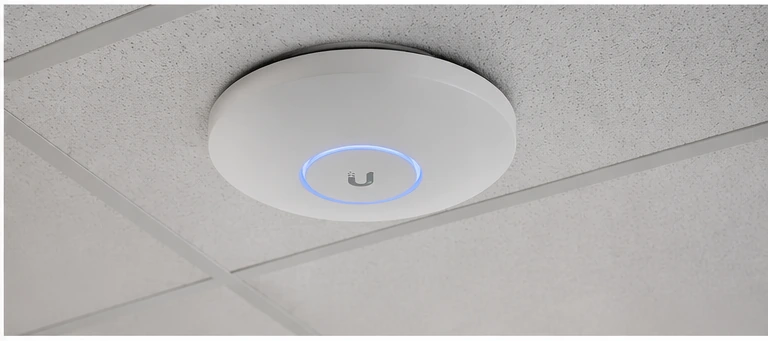
UniFi WiFi 7 commercial deployment replaces 2-3 Wi-Fi 6 access points with a single U7 Pro in high-density Texas commercial environments. The 802.11be (Wi-Fi 7) standard introduces the 6GHz band, Multi-Link Operation (MLO), and multi-RU OFDMA that reduce latency and increase per-client throughput in conference rooms, healthcare units, and open office floors with 50-200+ concurrent wireless clients.
| WiFi Standard | 802.11be (Wi-Fi 7), tri-band |
| Bands | 2.4GHz + 5GHz + 6GHz |
| Aggregate Throughput | 9.3Gbps |
| MLO | Multi-Link Operation (5GHz + 6GHz bonded) |
| PoE Requirement | 802.3at (PoE+), 25.5W |
| Client Capacity | 300+ concurrent devices |
UniFi WiFi 7 commercial deployment planning requires understanding which client devices support Wi-Fi 7 — the 6GHz band and MLO features require Wi-Fi 7 or Wi-Fi 6E client hardware to deliver their maximum throughput benefit.
What is UniFi U7 Pro (WiFi 7)?
The UniFi U7 Pro is a tri-band 802.11be (Wi-Fi 7) access point delivering 2.4GHz (688Mbps), 5GHz (2882Mbps), and 6GHz (5765Mbps) with a 9.3Gbps aggregate throughput. UniFi WiFi 7 commercial deployment uses Multi-Link Operation (MLO) to simultaneously bond 5GHz and 6GHz bands per client, reducing latency below 1ms for real-time applications. The U7 Pro supports 300+ concurrent client devices with 4×4 MIMO on all bands.
Wi-Fi 7 introduces three key capabilities over Wi-Fi 6E: Multi-Link Operation (simultaneous multi-band per client), 320MHz channel width (doubles bandwidth over Wi-Fi 6), and Multi-RU OFDMA (multiple resource units per client per OFDMA symbol). In Texas commercial environments, MLO provides the most immediate benefit — conference rooms where 30-50 devices need low-latency video conferencing simultaneously see measurable improvement over Wi-Fi 6 deployments.
The 6GHz band is available only to Wi-Fi 6E and Wi-Fi 7 client devices. Texas commercial deployments with primarily legacy (Wi-Fi 5 or Wi-Fi 6) clients will use the 2.4GHz and 5GHz bands primarily, with the 6GHz band available for newer devices. 2M Technology assesses client device inventory before recommending U7 Pro versus Wi-Fi 6E alternatives for each Texas project.
UniFi WiFi 7 commercial deployment delivers different benefits in different Texas commercial environments — identifying the right use case determines the expected performance improvement.
Commercial Use Cases in Texas
Texas High-Density Conference Centers and Hotels
Conference rooms and meeting spaces with 30-100 simultaneous devices (laptops, phones, tablets) are the primary beneficiary of UniFi WiFi 7 commercial deployment. MLO reduces the latency that causes video conferencing artifacts when multiple devices contend for airtime. One U7 Pro covers a standard 50-person conference room with headroom for future device density increases.
Texas Healthcare Facilities
Healthcare environments deploy wireless devices for telemetry, bedside tablets, mobile workstations, and real-time location systems (RTLS). The sub-1ms latency capability of Wi-Fi 7 MLO supports time-sensitive medical telemetry better than previous Wi-Fi generations. 2M Technology designs healthcare U7 Pro deployments with specific channel plans that minimize interference with medical device frequency allocations.
Texas Open Office and Co-Working Spaces
Modern Texas open office layouts with hot-desking and flexible seating densities of 1 person per 50-80 sq ft create wireless environments with highly variable client density. The U7 Pro’s 4×4 MIMO and MU-MIMO capabilities serve multiple clients simultaneously rather than sequentially, maintaining consistent throughput as density increases throughout the business day.
UniFi WiFi 7 commercial deployment technical specifications from Ubiquiti’s published U7 Pro datasheet — 2M Technology verifies these values before specifying the U7 Pro for Texas commercial projects.
Technical Specifications
| Specification | Value | Commercial Note |
|---|---|---|
| WiFi Standard | IEEE 802.11be (Wi-Fi 7), backward compatible with 802.11a/b/g/n/ac/ax | Wi-Fi 7 clients get full MLO and 6GHz benefits; older clients connect normally |
| 2.4GHz Radio | 4×4 MIMO, up to 688Mbps | Limited by interference in congested 2.4GHz environments |
| 5GHz Radio | 4×4 MIMO, up to 2882Mbps | Primary band for Wi-Fi 5/6 clients — most used band |
| 6GHz Radio | 4×4 MIMO, up to 5765Mbps | Available to Wi-Fi 6E and Wi-Fi 7 clients only; least congested band |
| Aggregate Throughput | 9.3Gbps combined across all bands | Single client theoretical max varies by band and channel width |
| Multi-Link Operation | Yes — simultaneous 5GHz + 6GHz per client | Reduces effective latency below 1ms for Wi-Fi 7 clients |
| OFDMA | Multi-RU OFDMA on all bands | Enables more efficient spectrum use under high client density |
| PoE Requirement | 802.3at (PoE+), 25.5W | Requires PoE+ port on IDF switch — standard 802.3af insufficient |
| Client Capacity | 300+ concurrent devices | Actual performance varies by application mix and client hardware |
| Mount | Ceiling surface mount or flush (standard electrical box compatible) | Ceiling center mount recommended for omnidirectional coverage |
Source: Ubiquiti UniFi Tech Specs — WiFi
UniFi WiFi 7 commercial deployment requires PoE+ infrastructure and a well-designed channel plan — 2M Technology conducts RF site surveys for Texas commercial deployments exceeding 5 access points.
Deployment Requirements
| Requirement | Specification |
|---|---|
| PoE Requirement | 802.3at (PoE+), 25.5W — standard 802.3af ports (15.4W) cannot power the U7 Pro at full radio capacity |
| Cabling | Cat5e or Cat6, max 100m copper run per AP from PoE switch |
| Mounting Height | Ceiling center mount recommended at 3-4m (10-13ft) for typical commercial floor coverage |
| Coverage Radius | Approximately 15-20m (50-65ft) radius per U7 Pro in open office; less in obstructed environments |
| Channel Planning | Non-overlapping channel assignment required for adjacent APs; 2M Technology provides RF channel plan |
| Network | Dedicated AP management VLAN; separate SSIDs for corporate and guest traffic on appropriate VLANs |
| Controller | UniFi Network Application for AP adoption, SSID configuration, roaming settings, and RF optimization |
UniFi WiFi 7 commercial deployment integrates with UniFi Network for SSID management, roaming configuration, and RF analytics — 2M Technology configures BSS coloring, RRM, and fast roaming on every Texas AP deployment.
UniFi Ecosystem Integration
The U7 Pro integrates with the UniFi Dream Machine Pro gateway for SSID broadcasting, client authentication (WPA3, 802.1X RADIUS), and centralized RF management. 2M Technology configures Band Steering to push Wi-Fi 7 clients to 6GHz and legacy clients to 5GHz, ensuring that bandwidth-intensive clients are not competing with legacy devices on the same radio.
For Texas healthcare and enterprise deployments requiring seamless roaming, 2M Technology enables 802.11r (Fast BSS Transition) on all UniFi WiFi 7 access points, reducing roaming handoff time from 200-400ms (standard roaming) to under 50ms. This is required for voice over Wi-Fi (VoWiFi) and real-time telemetry applications that cannot tolerate longer roaming interruptions.
Comparing UniFi WiFi 7 commercial deployment against Cisco Meraki and Aruba Instant AX shows where UniFi”s flat licensing model provides the most significant 5-year cost advantage.
UniFi U7 Pro vs Commercial Wi-Fi 7 Alternatives
| Feature | UniFi (2M Technology) | Cisco Meraki MR57 | HPE Aruba AP-535 |
|---|---|---|---|
| WiFi Standard | 802.11be (Wi-Fi 7) | 802.11be (Wi-Fi 7) | 802.11ax (Wi-Fi 6) — not Wi-Fi 7 |
| Aggregate Throughput | 9.3Gbps | 5.4Gbps | 3.55Gbps |
| Bands | 2.4 + 5 + 6GHz tri-band | 2.4 + 5 + 6GHz tri-band | 2.4 + 5GHz dual-band |
| MLO | Yes | Yes | No |
| Management License | Included — UniFi | Meraki Dashboard — annual per-AP fee | Aruba Central — annual per-AP fee |
| 5-Year License Cost (per AP) | None | – | – |
| PoE Requirement | PoE+ (25.5W) | PoE+ (25.5W) | PoE+ (22.5W) |
Deploying PoE+ APs on 802.3af Switch Ports
The U7 Pro requires 802.3at PoE+ (25.5W) to operate all three radios simultaneously. Connecting to a standard 802.3af (15.4W) port causes the AP to operate in a reduced-power mode — typically disabling the 6GHz radio entirely, which eliminates the primary Wi-Fi 7 performance benefit. 2M Technology verifies PoE+ port availability on all IDF switches before U7 Pro deployments.
No RF Channel Planning
Deploying multiple U7 Pro APs without assigning non-overlapping channels on each band causes co-channel interference that degrades throughput below Wi-Fi 6 performance levels. 2M Technology assigns manual channels on 5GHz and 6GHz for all Texas commercial multi-AP deployments, using 80MHz channels on 5GHz and 160MHz on 6GHz where client density allows.
Expecting Wi-Fi 7 Benefits on Wi-Fi 6 Clients
The 6GHz band, MLO, and 320MHz channel width features of Wi-Fi 7 require Wi-Fi 7-capable client hardware. Existing Wi-Fi 6 and Wi-Fi 6E clients will use 5GHz and 2.4GHz bands normally but cannot benefit from MLO or 6GHz access. 2M Technology assesses the client device inventory for each Texas project before recommending U7 Pro versus the previous-generation Wi-Fi 6E access points.
UniFi WiFi 7 commercial deployment questions from Texas IT managers, facility directors, and network engineers — answered with specific values.
Frequently Asked Questions
Does the U7 Pro require Wi-Fi 7 client devices to work?
No. The U7 Pro is backward compatible with all Wi-Fi standards (802.11a/b/g/n/ac/ax). Wi-Fi 6, Wi-Fi 5, and older clients connect normally via 2.4GHz and 5GHz bands. The performance improvements of Wi-Fi 7 — 6GHz access, MLO bonding, and 320MHz channels — are only available to client devices with Wi-Fi 7 chips (2024 and newer laptops, phones, and tablets).
How many U7 Pro APs does a Texas office floor need?
In a typical open-plan Texas office at 80-100 sq ft per workstation, with 30% simultaneous wireless device density, one U7 Pro covers 3,000-4,000 sq ft adequately. A 10,000 sq ft floor typically needs 3-4 U7 Pro APs. In high-density conference room scenarios (100+ devices per room), 2M Technology places one U7 Pro per large conference room regardless of square footage.
What PoE switch is required for UniFi WiFi 7 deployment?
The U7 Pro requires 802.3at PoE+ (25.5W per port). The UniFi Enterprise Switch 48 PoE provides PoE+ on all 48 ports with a 600W total budget. A 20-AP U7 Pro floor with each AP drawing 25.5W = 510W total — within the 600W budget but leaving limited headroom for other PoE devices on the same switch. 2M Technology calculates PoE allocation across all switch ports before finalizing the IDF switch model.
Is 6GHz available in all Texas commercial buildings?
Yes. 6GHz (Wi-Fi 6E and Wi-Fi 7) is available indoors in the US under FCC Rules Part 15 for standard power operation. Outdoor 6GHz use requires FCC coordination and automated frequency coordination (AFC) compliance. All Texas indoor commercial deployments using the U7 Pro can use the 6GHz band without regulatory coordination.
Does UniFi charge per-AP licensing for the U7 Pro?
No. UniFi Network Application is included with U7 Pro hardware at no per-AP annual cost. All configuration, monitoring, and RF management is included without licensing fees. This contrasts with Cisco Meraki (approximately – per AP over 5 years in licensing) and HPE Aruba Central (approximately – per AP over 5 years).
Related Deployment Guides
PoE+ switch required for U7 Pro access points
WAN edge and SSID management for Texas commercial networks
Wireless SSID to VLAN mapping for Texas commercial networks
Calculate PoE capacity for Wi-Fi 7 deployments
← Back to UniFi Infrastructure Deployment Center
Deploy UniFi U7 Pro for Your Texas Network
2M Technology provides end-to-end UniFi WiFi 7 commercial deployment services — network design, hardware procurement, installation, VLAN configuration, and ongoing support across Dallas-Fort Worth and all of Texas.


