
Home › UniFi Deployment Center › UniFi Gateway Commercial Deployment Guide
Trusted UniFi Gateway Commercial Deployment Guide | Dream Machine Pro for Texas Enterprise
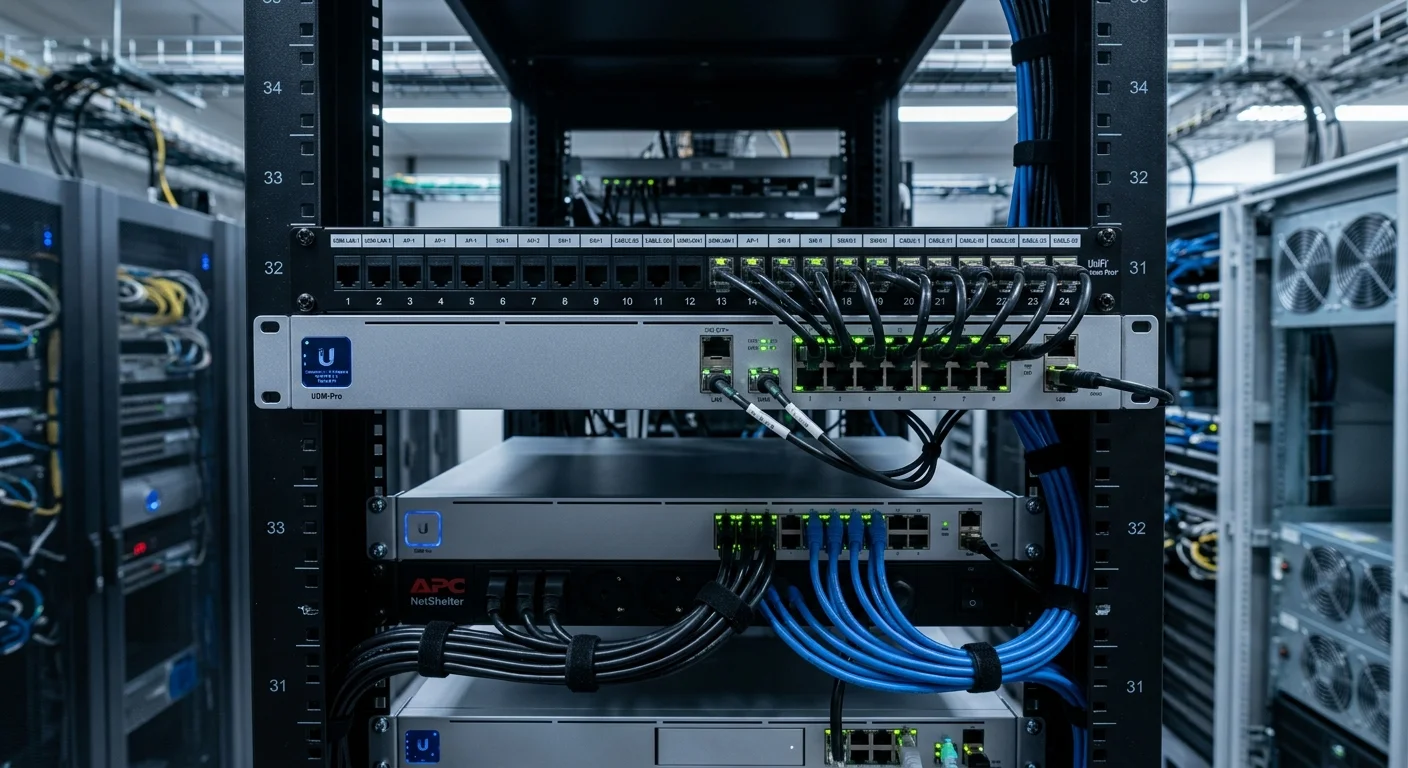
UniFi gateway commercial deployment centers on the Dream Machine Pro (UDM-Pro) — a 1U rack-mount enterprise gateway that consolidates 10G WAN connectivity, UTM security (IDS/IPS, deep packet inspection), an 8-port built-in PoE switch, and the UniFi OS management platform into a single device. 2M Technology deploys the UDM-Pro as the network edge for Texas commercial facilities with 50-500 connected devices requiring enterprise-grade threat protection without a separate security appliance.

Quick Reference — UniFi Dream Machine Pro (UDM-Pro)
gateway commercial deployment — available through 2M Technology
| WAN | 1 x 10GbE SFP+, 1 x GbE RJ45 (dual WAN) |
|---|---|
| LAN | 8 x GbE (PoE-capable), 2 x SFP+ LAN uplinks |
| IDS/IPS | 3.5Gbps routing, 1.3Gbps IPS throughput |
| UniFi OS | Network, Protect, Access, Talk — unified |
| NVR Storage | 1 x 3.5-inch HDD bay (up to 7 cameras) |
| Form Factor | 1U rack-mount |
1. What is UniFi Dream Machine Pro?
The UniFi Dream Machine Pro (UDM-Pro) is a 1U enterprise gateway running UniFi OS with 10G WAN SFP+, dual-WAN failover, IDS/IPS at 1.3Gbps, and an integrated 8-port GbE PoE switch. UniFi gateway commercial deployment uses the UDM-Pro as the single management platform for the entire UniFi stack — network switching, camera surveillance (UniFi Protect), door access control (UniFi Access), and VoIP (UniFi Talk) — managed through one console with no per-feature licensing.
UniFi gateway commercial deployment selection requires matching the UDM-Pro WAN throughput and IPS performance to the Texas facility’s internet circuit speed and security requirements — larger deployments may require the UDM-Pro SE or UDM-Enterprise.
The 10G SFP+ WAN port supports fiber or copper connections to ISPs delivering 1-10Gbps internet service to Texas commercial facilities — a bandwidth range covering most enterprise and multi-tenant commercial buildings. Dual-WAN configuration uses the secondary GbE WAN port for cellular failover or secondary ISP, automatically switching traffic when the primary circuit drops without interrupting active sessions.
UniFi OS on the UDM-Pro consolidates all UniFi management applications: UniFi Network (switching, wireless, routing), UniFi Protect (cameras, NVR), UniFi Access (door controllers, readers), and UniFi Talk (VoIP phones). For Texas commercial deployments where a unified management platform reduces operational complexity, the UDM-Pro eliminates the need for separate management servers for each function.
2. Commercial Use Cases in Texas
UniFi gateway commercial deployment at different Texas commercial facility sizes requires matching UDM-Pro throughput and feature set to the specific network scale and security requirements.
Texas Mid-Market Office Buildings (50-500 devices)
The UDM-Pro is 2M Technology’s standard gateway recommendation for Texas commercial buildings with 50-500 connected devices. At 3.5Gbps routing throughput with IPS disabled, and 1.3Gbps with IPS active, the UDM-Pro handles most commercial internet connections (1Gbps fiber is the most common Texas enterprise circuit) while providing deep packet inspection without a separate security appliance.
Texas Multi-Site Commercial Networks (Site-to-Site VPN)
Texas businesses with multiple office locations deploy the UDM-Pro at each site and use UniFi’s Site Magic (site-to-site VPN) to connect locations into a unified private network. A Dallas headquarters UDM-Pro creates encrypted tunnels to Fort Worth, Plano, and Arlington branch offices automatically — providing inter-site connectivity managed from a single UniFi console without third-party VPN hardware.
Texas Retail and Restaurant Chains (Central Management)
Texas retail and restaurant chains with 20-50 locations use the UDM-Pro at each site with centralized management through UniFi’s cloud portal. A corporate IT team manages all site policies, guest WiFi SSIDs, firewall rules, and camera access from the central portal without visiting each location. 2M Technology provides the initial deployment and ongoing remote management support for multi-site Texas retail clients.
3. Technical Specifications
UniFi gateway commercial deployment technical specifications from Ubiquiti’s published UDM-Pro datasheet, verified in Texas commercial deployments by 2M Technology.
| Specification | Value | Commercial Note |
|---|---|---|
| WAN Ports | 1 x 10GbE SFP+, 1 x GbE RJ45 (dual-WAN failover) | 10G fiber to ISP; GbE as LTE/cellular failover |
| LAN Ports | 8 x GbE RJ45 (PoE-capable), 2 x 10G SFP+ LAN | Built-in 8-port switch for direct device connections |
| Routing Throughput | 3.5Gbps with threat management off | Handles 1Gbps and 2.5Gbps business internet circuits with headroom |
| IPS Throughput | 1.3Gbps with IDS/IPS active | IPS throughput limits available with full threat management enabled |
| Deep Packet Inspection | Yes — application detection and blocking | Identify and block specific applications on business network |
| UniFi OS Apps | Network, Protect, Access, Talk (all included) | Single platform — no per-feature license or separate server |
| NVR Storage | 1 x 3.5-inch HDD bay (up to 7 cameras, 20TB max) | Small camera deployments only; larger sites need dedicated UNVR |
| VPN | Site-to-site (UniFi Site Magic), OpenVPN, WireGuard, L2TP client | Multi-protocol VPN without third-party appliance |
| Form Factor | 1U rack-mount, standard 19-inch EIA | Compact — fits in MDF alongside aggregation switch and patch panels |
| Redundant Power | Single PSU (no hot-swap redundancy) | UPS required for business continuity during Texas power events |
4. Deployment Requirements
UniFi gateway commercial deployment installation in Texas commercial MDF environments requires WAN ISP coordination, VLAN design, and firewall rule planning before equipment arrives on-site.
| Requirement | Specification |
|---|---|
| WAN Circuit | 1Gbps or 10Gbps fiber ISP circuit to 10G SFP+ WAN port; LTE/cellular router for GbE WAN failover |
| Rack Space | 1U in 19-inch EIA rack in MDF; 1U clearance recommended for airflow |
| Power | Standard IEC C14 inlet; single PSU — connect to UPS minimum 1500VA for Texas commercial deployments |
| LAN Design | VLAN design and firewall rules documented before installation; 2M Technology provides network design document |
| IP Addressing | Static or DHCP WAN as required by ISP; static IPs from ISP required for inbound services |
| Management Access | UniFi console accessible via local IP during setup; cloud access configured after initial commissioning |
| Security Policies | Threat management profiles, firewall rule sets, and application control policies — 2M Technology provides templates |
5. UniFi Ecosystem Integration
UniFi gateway commercial deployment consolidates all UniFi management applications into a single gateway device — 2M Technology configures the full stack as part of every Texas commercial UDM-Pro deployment.
The UDM-Pro runs the full UniFi OS stack, integrating directly with UniFi switches, U7 Pro access points, UniFi Access door controllers, and UniFi Protect cameras (up to 7 cameras on the built-in NVR bay). All configuration — VLANs, firewall rules, SSID policies, access schedules, and camera recording settings — is managed through the UDM-Pro’s unified web console.
For Texas multi-site deployments, 2M Technology uses UniFi’s cloud portal to manage all UDM-Pro gateways from a single login. Site policies (firewall rules, SSID configurations, threat management profiles) are defined at corporate level and pushed to all sites simultaneously, eliminating per-site configuration drift and ensuring consistent security posture across the Texas location portfolio.
6. UniFi Dream Machine Pro vs Commercial Alternatives
Comparing UniFi gateway commercial deployment against Cisco and Fortinet alternatives demonstrates where UniFi consolidates multiple devices into one and eliminates licensing that compounds annually.
| Feature | UniFi (2M Technology) | Cisco Meraki MX75 | Fortinet FortiGate 80F |
|---|---|---|---|
| WAN | 10G SFP+ + GbE dual-WAN | 1G SFP+ dual-WAN | 1G WAN (no 10G on base) |
| IPS Throughput | 1.3Gbps | 1Gbps | 900Mbps |
| Built-in Switch | 8-port GbE PoE | None | None |
| Management | Included — UniFi OS | Meraki Dashboard — annual license | FortiManager — per-device license |
| 5-Year License (per device) | None | ,500-,000 | ,800-,000 |
| Unified Platform | Network + Cameras + Access + VoIP | Network only — separate Meraki MV for cameras | Network + FortiSwitch + FortiAP separately licensed |
| Site-to-Site VPN | Included — Site Magic / WireGuard | Included | Included |
7. Common UniFi Gateway Commercial Deployment Mistakes
Not Connecting UDM-Pro to UPS
The UDM-Pro has a single PSU with no battery backup. A power interruption — common during Texas thunderstorms — drops all internet, firewall, and network functions simultaneously, including cameras and door access control. 2M Technology specifies a minimum 1500VA UPS for every Texas commercial UDM-Pro installation, providing 15-30 minutes of runtime to survive typical power outage events.
Enabling IPS Without Testing Throughput Impact
Activating IDS/IPS reduces UDM-Pro throughput from 3.5Gbps to 1.3Gbps. For Texas facilities with internet circuits at or below 1Gbps, this is not an issue. For 2.5Gbps or 10Gbps fiber circuits, IPS activation creates a bottleneck. 2M Technology tests throughput with IPS enabled before project completion and documents the effective WAN speed for the client.
Using the Built-in NVR Bay for Commercial Camera Deployments
The UDM-Pro’s single 3.5-inch HDD bay supports a maximum of 7 cameras and 20TB storage — appropriate only for very small camera deployments. Texas commercial facilities with 8 or more cameras require a dedicated UNVR, UNVR Pro, or Enterprise NVR. Deploying 12 cameras to the UDM-Pro NVR exceeds its capacity and results in cameras being dropped from recording rotation.
Multi-Site WAN Architecture and Security Segmentation
The Dream Machine Pro is not simply a gateway device — it is a WAN edge platform that defines how commercial networks segment, route, and fail over. For Texas businesses with distributed operations, the UDM-Pro architecture decisions made at installation determine network reliability, security posture, and operational continuity for the life of the deployment. 2M Technology designs WAN architecture before recommending any gateway hardware.
COMMERCIAL NETWORK SEGMENTATION ARCHITECTURE
=============================================

           [Internet / WAN]
                 |
          [UDM-Pro WAN Edge]
         10G SFP+ primary WAN
         GbE secondary WAN (LTE failover)
                 |
    _______ Firewall Zone _______
    |           |       |       |
 [VLAN 10]  [VLAN 20] [VLAN 30] [VLAN 40]
  Business   Cameras   Guest    OT/IoT
  Network    (NVR only) Portal  (isolated)
    |           |       |       |
  Full        NVR    Internet   No routing
  access      only   only      to any other
                               segment

ZONE ISOLATION RULES:
  Camera VLAN (20) -- routes ONLY to NVR on VLAN 10 subnet
  Guest VLAN (30)  -- internet only, no LAN access
  OT VLAN (40)     -- no routing to any other segment
  Business (10)    -- access to all VLANs via firewall rules

CONTRACTOR ISOLATION:
  Temporary VLAN 50 -- created per project, deleted on completion
  SSID: 2MTech-Contractor-[ProjectID]
  Access: internet + specific resource only
  Duration: auto-expires via scheduled SSID disable
WAN Failure Scenarios and Failover Engineering
WAN failure scenarios are not edge cases for Texas commercial facilities — they are routine operational events. Texas thunderstorms, fiber cuts, ISP outages, and equipment failures affect commercial internet service regularly. A gateway with no failover plan means business interruption. 2M Technology designs WAN redundancy as a baseline, not an option, for every commercial UDM-Pro deployment.
| Failure Scenario | Impact Without Failover | UDM-Pro Failover Solution |
|---|---|---|
| Primary ISP fiber cut | Complete internet and VPN outage; remote access lost | LTE/5G cellular router on GbE WAN2; auto-failover in under 30 seconds |
| ISP BGP route instability | Intermittent connectivity; VoIP calls drop; camera cloud alerts fail | Dual-WAN load balancing; health check routing prefers stable path |
| Camera VLAN traffic spike | Camera recording saturates uplink; business internet unusable | Traffic shaping: camera VLAN limited to 80% of uplink; business traffic priority |
| UDM-Pro power failure | All network segments go offline simultaneously | UPS minimum 1500VA; UDM-Pro powers off last, restores first on UPS power return |
| VPN tunnel congestion | Inter-site traffic slows; remote workers disconnect from site resources | Site Magic auto-optimizes; WireGuard protocol minimizes overhead vs OpenVPN |
Operational Traffic Prioritization: QoS Engineering
A commercial network carries multiple traffic types with fundamentally different latency and bandwidth requirements. VoIP calls require consistent low latency. Video surveillance requires high sustained bandwidth. Guest traffic should be rate-limited. AI analytics traffic must not compete with production applications. 2M Technology configures QoS policies on every UDM-Pro deployment to ensure each traffic class receives appropriate treatment.
| Traffic Class | QoS Priority | Rate Limit | Latency Requirement |
|---|---|---|---|
| VoIP / UniFi Talk | Highest (DSCP EF) | Uncapped, reserved bandwidth | <20ms required |
| Video surveillance (camera to NVR) | High (DSCP AF41) | 80% of camera VLAN uplink | <50ms acceptable |
| Business applications | Medium (DSCP AF21) | Uncapped on business VLAN | <100ms acceptable |
| Access control | Medium-High | Minimal bandwidth, low latency | <50ms required for door events |
| Guest WiFi | Low (DSCP CS1) | 20Mbps down / 5Mbps up per client | Best effort acceptable |
| Contractor VLAN | Low-Medium | 50Mbps aggregate cap | Best effort acceptable |
Security Segmentation Workflows: Zero-Trust Commercial Networking
Zero-trust network segmentation is not an enterprise-only concept — it is a baseline commercial security requirement. Any Texas business with cameras, access control, guest WiFi, and employee workstations on the same network has an unnecessary attack surface that creates both security and liability exposure. The UDM-Pro implements zero-trust segmentation that isolates each function at the firewall level.
2M Technology Zero-Trust Commercial Baseline Configuration:
- Camera VLAN: no outbound internet; NVR access only; Protect cloud relay via gateway proxy
- Guest VLAN: internet only; no access to any RFC 1918 address space
- OT/IoT VLAN: no routing; air-gapped from all other segments at firewall layer
- Business VLAN: standard internet + internal resources; no access to camera or OT VLANs
- Management VLAN: admin workstations only; SSH/SNMP access to all network devices
- Contractor VLAN: internet + explicit resource whitelist; auto-expiry after project end
For complete VLAN architecture documentation and security segmentation design, see the UniFi VLAN Design Commercial Security Guide. For the full deployment center resource library including switching, cabling, and access control integration, see the UniFi Infrastructure Deployment Center.
8. Frequently Asked Questions
UniFi gateway commercial deployment questions from Texas IT managers and business owners considering the Dream Machine Pro for their facility.
How many devices can the UDM-Pro handle?
The UDM-Pro supports up to approximately 200-500 concurrent connected devices at full throughput depending on traffic profile. At 3.5Gbps routing capacity, a 500-device Texas office consuming an average 7Mbps per device simultaneously would hit the throughput ceiling. In practice, Texas commercial deployments with 300 or fewer devices see no performance limitation at typical usage patterns.
Does the UDM-Pro include an antivirus or firewall?
Yes. The UDM-Pro includes Intrusion Detection System (IDS), Intrusion Prevention System (IPS), Deep Packet Inspection (DPI) for application detection, and a stateful firewall with zone-based rules. Threat intelligence signatures are updated automatically. Advanced content filtering and DNS-based blocking are also available through the UniFi Network application without additional licensing.
Can the UDM-Pro handle a 1Gbps fiber internet circuit?
Yes. At 1Gbps WAN speed with IPS enabled, the UDM-Pro operates well within its 1.3Gbps IPS throughput limit. For Texas commercial sites with 1Gbps symmetrical fiber, the UDM-Pro with full threat management active handles the full circuit speed without throttling. Sites with 2.5Gbps or 10Gbps circuits should consider the UDM-Pro SE or UDM-Enterprise for higher IPS throughput capacity.
Does the UDM-Pro support VPN for remote employees?
Yes. The UDM-Pro supports WireGuard VPN, OpenVPN, and L2TP for remote employee access. WireGuard provides the highest throughput with lowest overhead — recommended for Texas commercial deployments with 10+ concurrent remote workers. Site-to-site VPN between multiple Texas office locations uses UniFi Site Magic, which creates encrypted tunnels automatically between all UDM-Pro gateways in the same UniFi account.
Is the UDM-Pro sufficient for a multi-tenant Texas office building?
For multi-tenant buildings where each tenant requires isolated network access, the UDM-Pro can create separate VLANs and firewall policies per tenant with a single device at the building edge. For buildings with more than 500 total devices or requiring 2.5Gbps+ per-tenant throughput, 2M Technology evaluates the UDM-Enterprise or per-tenant gateway architecture. Contact 2M Technology for a multi-tenant network assessment.
Related Deployment Guides — Plan the Full System
Deploy UniFi Dream Machine Pro for Your Texas Network
- Texas Private Security License B15309
- (214) 988-4302
- sales@2mtechnology.net


