
Proven UniFi Enterprise Switch Deployment Guide | 48-Port PoE Switch for Texas Commercial Networks
Updated May 2026Layer 3 managed switch with 600W PoE budget, 4x10G uplinks, and VLAN support — the IDF access switch for Texas enterprise camera, AP, and phone deployments
Get a Free Network Assessment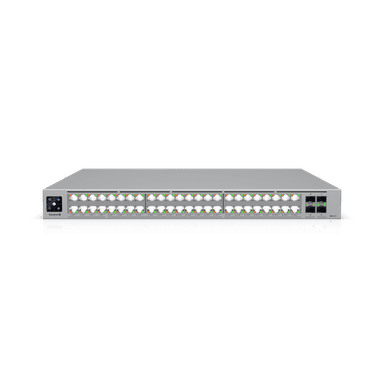
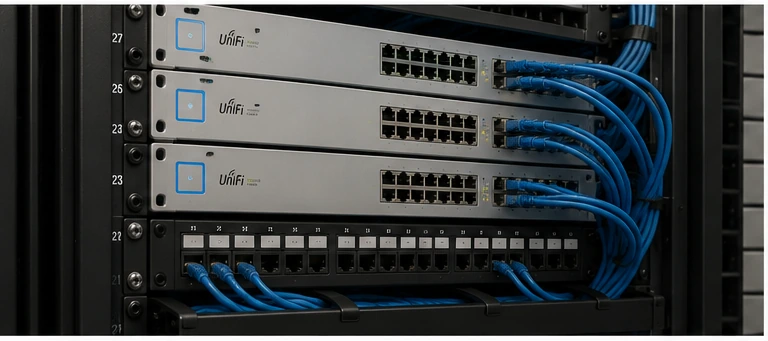
UniFi Enterprise switch deployment in Texas commercial IDF panels provides the Layer 3 PoE switching capacity needed to support mixed camera, access point, phone, and access control deployments from a single managed switch. The 48-port 600W PoE budget accommodates 48 concurrent PoE devices with room for PTZ and 802.3bt (PoE++) devices, while four 10G SFP+ uplinks connect to aggregation or core switching without bandwidth bottlenecks.
| PoE Ports | 48 x GbE RJ45 (PoE/PoE+/PoE++) |
| PoE Budget | 600W total |
| Uplinks | 4 x 10GbE SFP+ |
| Switching Capacity | 176Gbps non-blocking |
| Layer | Layer 3 (OSPF, static routing) |
| Form Factor | 1U rack-mount |
UniFi Enterprise switch deployment planning centers on PoE budget allocation across all connected devices — a single oversized PTZ camera or 802.3bt AP can consume PoE budget that would otherwise power 4-6 standard cameras.
What is UniFi Enterprise Switch 48 PoE?
The UniFi Enterprise Switch 48 PoE (ECS-48-PoE) is a 48-port Layer 3 managed switch with 600W total PoE budget supporting 802.3af (15.4W), 802.3at (30W), and 802.3bt (60/90W) per port. UniFi Enterprise switch deployment in Texas commercial IDF environments supports up to 48 concurrent PoE devices — cameras, access points, IP phones, and access control readers — with VLAN segmentation, QoS, LACP, and OSPF routing managed through the UniFi Network Application.
The 4 x 10G SFP+ uplinks connect to an aggregation switch or directly to a core router, providing 40Gbps of total uplink capacity — sufficient to handle full line-rate traffic from all 48 GbE ports simultaneously. This eliminates the bandwidth bottleneck common in lower-end switches where uplinks become the throughput constraint under heavy camera recording or high-density WiFi loads.
Layer 3 routing capability allows the Enterprise Switch to route between VLANs locally without sending traffic to a central router — reducing latency for camera-to-NVR traffic on the same IDF switch and eliminating inter-VLAN routing load from the MDF core device.
Identifying the right UniFi Enterprise switch deployment application for each Texas IDF determines whether the 48-port model or a smaller switch better fits the deployment budget and port density requirements.
Commercial Use Cases in Texas
Commercial Building IDF Panels
Texas commercial buildings with 30-48 PoE devices per floor (cameras, APs, phones, access readers) deploy the Enterprise Switch 48 PoE as the primary IDF access switch. 2M Technology sizes one switch per floor in typical office buildings, with 10G uplinks to the MDF aggregation switch providing non-blocking connectivity to the building core network.
Camera-Dense Security Deployments
Texas facilities deploying 20-40 IP cameras across a single network segment deploy the Enterprise Switch as the camera aggregation switch. The 600W PoE budget supports 40 standard PoE cameras (15.4W each = 616W peak — requires load management), or a mix of standard and PoE+ cameras within the total budget. 2M Technology calculates per-port PoE allocation during the design phase.
Multi-Service IDF with Cameras, APs, and Phones
The Enterprise Switch 48 PoE is 2M Technology’s standard IDF switch for Texas commercial buildings requiring multiple PoE device types on dedicated VLANs. Camera traffic, AP management traffic, and VoIP traffic are segmented into separate VLANs and prioritized via QoS (DSCP marking) without requiring a separate switch per service type.
UniFi Enterprise switch deployment technical specifications from Ubiquiti’s published datasheet, as deployed by 2M Technology in Texas commercial IDF panels.
Technical Specifications
| Specification | Value | Commercial Note |
|---|---|---|
| Access Ports | 48 x GbE RJ45 — all PoE-capable | Each port independently configurable for PoE mode and VLAN |
| PoE Standards | 802.3af (15.4W), 802.3at (30W), 802.3bt (60W/90W) | Single port can deliver up to 90W for 802.3bt devices |
| Total PoE Budget | 600W across all ports | Average 12.5W per port if all 48 ports are loaded simultaneously |
| Uplink Ports | 4 x 10GbE SFP+ (fiber or copper DAC) | Connect to aggregation switch or core router via fiber or 10G copper |
| Switching Capacity | 176Gbps non-blocking | Handles full line-rate on all ports simultaneously without contention |
| Layer | Layer 3 (OSPF, RIP v1/v2, static routing) | Routes between VLANs locally without hairpinning to core router |
| VLAN Support | IEEE 802.1Q, up to 4094 VLANs | 2M Technology typically configures 4-8 VLANs per IDF switch |
| QoS | 802.1p CoS and DSCP marking and remarking | Critical for VoIP quality alongside camera traffic on same uplink |
| Link Aggregation | IEEE 802.3ad LACP, up to 8-port LAG | Bond multiple uplinks for increased bandwidth and redundancy |
| Form Factor | 1U rack-mount, standard 19-inch EIA | Requires 1U plus 1U clearance in IDF for airflow |
Source: Ubiquiti UniFi Tech Specs — Switching
UniFi Enterprise switch deployment infrastructure requirements in Texas commercial IDF panels include rack space, power, cable management, and uplink fiber — 2M Technology designs and installs all four as part of every IDF deployment.
Deployment Requirements
| Requirement | Specification |
|---|---|
| Rack Space | 1U in 19-inch EIA rack; 1U clearance above for airflow |
| Power | Standard C14/C15 IEC inlet; connect to UPS-protected circuit in IDF; 600W max draw under full PoE load |
| Uplink Cabling | 10G SFP+ to aggregation switch via OM3/OM4 fiber or 10G DAC cable; max 10m for DAC, 300m for OM3 LC fiber |
| Access Cabling | Cat5e or Cat6 from IDF patch panel to each PoE device; max 100m copper run per port |
| Management | Requires UniFi Network Application for configuration; locally managed via SSH/SNMP fallback |
| PoE Budget Planning | Calculate total connected device wattage before deployment; 2M Technology provides per-port PoE allocation documentation |
| Cooling | Fan-cooled — front-to-back airflow; align with hot/cold aisle if deployed in full data center environment |
UniFi Enterprise switch deployment in a Texas commercial building connects downward to PoE devices and upward to aggregation — 2M Technology designs the full vertical stack from cameras to core.
UniFi Ecosystem Integration
The Enterprise Switch 48 PoE integrates with UniFi Aggregation Switch via 10G SFP+ uplinks, forming the IDF-to-MDF backbone in Texas commercial buildings. Managed through the UniFi Network Application on the gateway, all switch configuration — VLANs, QoS, PoE profiles, port profiles — is deployed from a single management interface.
For Texas security deployments, camera-VLAN ports are isolated from business network VLANs, with inter-VLAN routing limited to camera-to-NVR paths. VLAN design is handled by 2M Technology during the design phase, with configuration templates pre-built before on-site installation to minimize commissioning time.
Comparing UniFi Enterprise switch deployment against Cisco and HPE Aruba alternatives demonstrates the total cost advantage of UniFi for Texas commercial projects where network management licensing is a significant budget item.
UniFi Enterprise Switch vs Commercial Alternatives
| Feature | UniFi (2M Technology) | Cisco Catalyst 9300-48P | HPE Aruba 2930F 48G |
|---|---|---|---|
| PoE Ports | 48 x GbE PoE/PoE+/PoE++ | 48 x GbE PoE+ | 48 x GbE PoE+ |
| PoE Budget | 600W | 880W | 740W |
| 10G Uplinks | 4 x SFP+ | 4 x SFP+ | 4 x SFP+ |
| Layer 3 Routing | Yes — OSPF, RIP | Yes — requires license | Yes — limited without license |
| Management License | Included (UniFi) | DNA Advantage — annual fee | Aruba Central — annual fee |
| Management Cost (5yr) | None | ,200-,000 per switch | -,500 per switch |
| Switching Capacity | 176Gbps | 176Gbps | 176Gbps |
Common UniFi Enterprise switch deployment mistakes in Texas commercial IDF deployments center on PoE budget overruns and VLAN misconfiguration — both affect camera and AP reliability immediately.
Common UniFi Enterprise Switch Deployment Mistakes
Exceeding PoE Budget with Mixed Device Types
A 48-port switch with 600W PoE budget averages 12.5W per port. Deploying 802.3bt APs (60-90W each) alongside standard cameras (15W each) can exceed the 600W budget if more than 6-8 high-wattage devices are connected. 2M Technology calculates per-port PoE allocation for every Texas switch deployment and distributes high-wattage devices across multiple switches if needed.
Using Default VLAN 1 for All Devices
Default VLAN 1 is untagged on all ports and carries management traffic on most Ubiquiti switches. Placing cameras, APs, and phones on VLAN 1 alongside management traffic creates both security exposure and broadcast domain size problems in larger Texas deployments. 2M Technology configures dedicated VLANs for each device class on every Enterprise Switch deployment.
Not Enabling RSTP on All Switches
Rapid Spanning Tree Protocol (RSTP) prevents Layer 2 loops that can bring down an entire network segment in seconds. Disabling or misconfiguring RSTP on Texas commercial switch deployments creates a latent risk where a cabling error or device failure triggers a broadcast storm. 2M Technology enables RSTP on all UniFi switches and verifies loop protection on every IDF during commissioning.
UniFi Enterprise switch deployment questions from Texas IT managers and network engineers — answered with specific values from UniFi IDF deployments.
Frequently Asked Questions
How many cameras can the Enterprise Switch 48 PoE support?
With standard PoE cameras drawing 10-15.4W each, the 600W PoE budget supports 39-60 cameras if cameras are the only PoE devices. In practice, most Texas commercial IDF switches also power access points (25-30W) and access control readers (5-10W). 2M Technology calculates the exact PoE allocation for each port in the design phase, ensuring the 600W budget is not exceeded under normal operating conditions.
What is the difference between the Enterprise Switch and standard UniFi PoE switches?
The Enterprise Switch 48 PoE adds Layer 3 routing (OSPF, inter-VLAN routing), 10G SFP+ uplinks, and 802.3bt (PoE++) support over standard UniFi PoE switches. Standard USW-Pro-48-PoE switches have 2x10G uplinks and 600W PoE but are Layer 2 only. The Enterprise Switch is appropriate for IDF deployments where local inter-VLAN routing or 802.3bt devices (WiFi 7 APs requiring 60W+) are required.
Can the Enterprise Switch route between camera VLAN and NVR VLAN locally?
Yes. Layer 3 routing on the Enterprise Switch allows camera VLAN traffic to route directly to the NVR VLAN at the IDF level without hairpinning to the core router. This reduces latency for camera-to-NVR traffic and removes inter-VLAN routing load from the MDF gateway. 2M Technology configures Layer 3 VLAN routing on IDF switches for Texas deployments where the NVR is co-located on the same IDF switch.
What SFP+ modules does 2M Technology use for uplinks?
For Texas commercial building IDF-to-MDF connections, 2M Technology uses Ubiquiti-branded SFP+ fiber modules (UF-SM-1G for 1G or UF-MM-10G for 10G multi-mode) when fiber runs are 30m or longer. For connections shorter than 7m, 10G DAC (Direct Attach Copper) passive twinax cables eliminate SFP+ module cost while providing full 10G throughput. Ubiquiti-branded modules are recommended to avoid compatibility issues in the UniFi ecosystem.
Does the Enterprise Switch require a separate network management license?
No. UniFi Network Application is included with the hardware at no additional annual cost. All switch configuration — VLANs, QoS, PoE profiles, port security, OSPF routing — is managed through the UniFi console without licensing fees. This is a key cost advantage over Cisco DNA Center and HPE Aruba Central, which require annual per-switch licensing for equivalent management functionality.
Related Deployment Guides
Core 10G switching for multi-IDF Texas commercial networks
Network segmentation for Texas commercial security systems
Calculate PoE capacity for your Texas deployment
Structured cabling design for Texas commercial buildings
← Back to UniFi Infrastructure Deployment Center
Deploy UniFi Enterprise Switch for Your Texas Network
2M Technology provides end-to-end UniFi Enterprise switch deployment services — network design, hardware procurement, installation, VLAN configuration, and ongoing support across Dallas-Fort Worth and all of Texas.

