
Home › UniFi Deployment Center › UniFi Aggregation Switch Deployment Guide
Trusted UniFi Aggregation Switch Deployment Guide | Core 10G Switching for Texas Commercial Networks
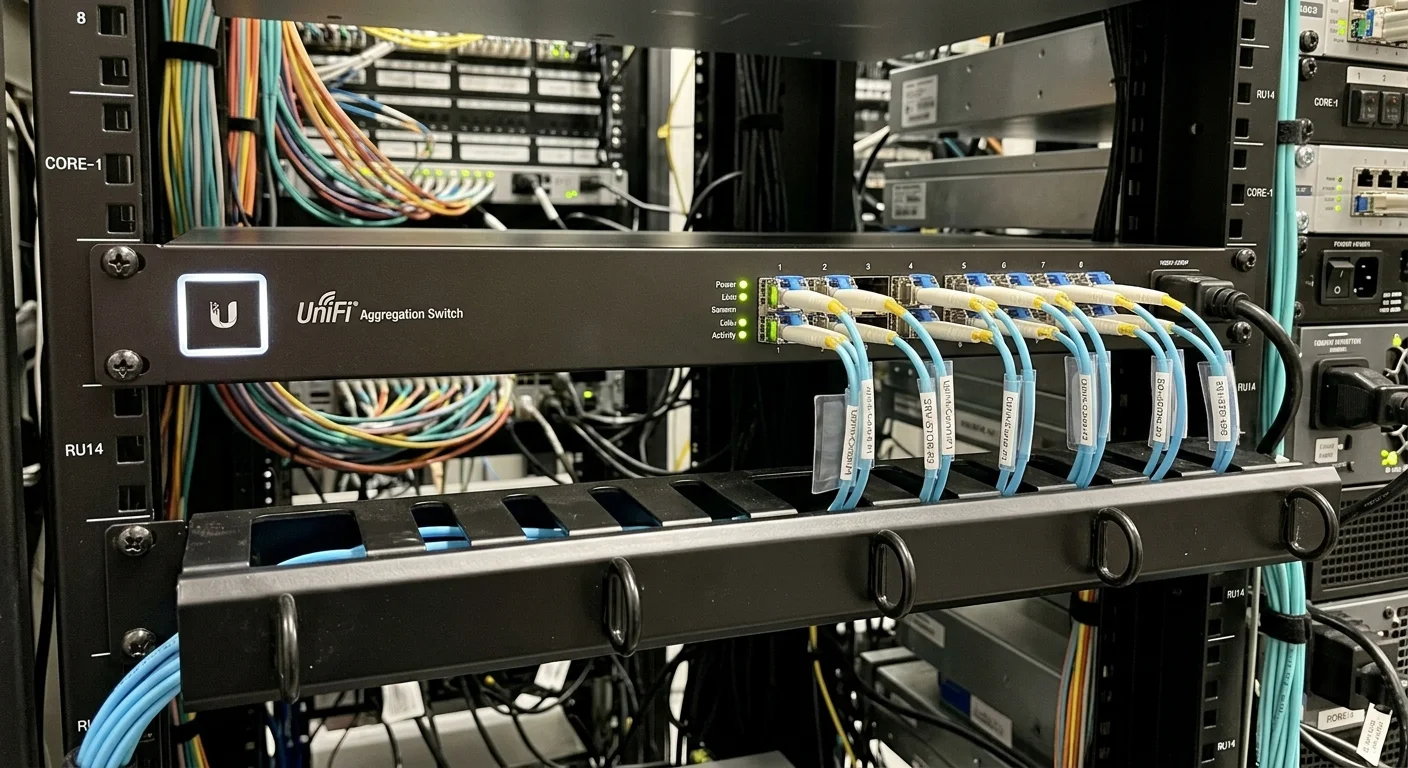
UniFi aggregation switch deployment sits at the MDF core of Texas commercial networks, aggregating 10G uplinks from multiple IDF access switches into a high-capacity switching fabric. Unlike IDF access switches that provide PoE to end devices, the aggregation switch is a pure-fiber, no-PoE device that maximizes port density and switching capacity for inter-switch and building-to-building connectivity.

Quick Reference — UniFi Aggregation Switch (USW-Aggregation)
aggregation switch deployment — available through 2M Technology
| Ports | 8 x SFP+ (10GbE), 1 x QSFP+ (40GbE) or similar |
|---|---|
| PoE | None — pure Layer 2/3 aggregation |
| Switching Capacity | 160Gbps+ |
| Form Factor | 1U rack-mount |
| Cooling | Passive (fanless) — silent operation |
| Management | UniFi Network Application |
1. What is UniFi Aggregation Switch?
The UniFi Aggregation Switch (USW-Aggregation) is a 1U multi-port 10GbE Layer 2/3 switch without PoE, designed to aggregate uplinks from multiple IDF access switches at the MDF core. UniFi aggregation switch deployment in Texas commercial buildings connects 6-8 floor-level IDF switches to a single MDF device, providing a high-capacity switching fabric between all building floors and to the WAN gateway without requiring a full enterprise core chassis switch.
UniFi aggregation switch deployment design determines how many IDF switches can connect to the MDF without bandwidth bottlenecks — each IDF access switch with a 10G uplink requires one aggregation port.
The aggregation switch fills the middle tier in a three-tier network architecture: access switches (IDF, PoE to end devices) — aggregation switch (MDF, inter-switch bandwidth) — gateway/router (WAN edge). In smaller Texas buildings with 2-3 floors, some deployments skip the aggregation tier and connect IDF switches directly to the gateway. The aggregation switch becomes necessary when IDF switch count exceeds 4-6, when inter-floor bandwidth demand exceeds gateway uplink capacity, or when multi-building fiber connections require a dedicated core device.
Unlike IDF access switches that require active cooling (fans) for 600W PoE budget heat dissipation, the aggregation switch operates passively or with low-noise fans since it generates no PoE heat — making it suitable for MDF environments where noise is a concern.
2. Commercial Use Cases in Texas
Matching UniFi aggregation switch deployment to the right Texas network architecture prevents premature bandwidth saturation as camera counts and AP deployments grow over the building’s operational life.
Multi-Floor Texas Commercial Buildings
A 5-floor Texas office building with one 48-port IDF switch per floor deploys the Aggregation Switch at the MDF to terminate all five 10G floor uplinks. Without the aggregation layer, each IDF switch uplink connects directly to the gateway, consuming gateway ports and creating a star topology that limits inter-floor switching performance.
Multi-Building Texas Campus Networks
Texas corporate campuses, university auxiliary buildings, and industrial parks connecting multiple buildings via outdoor fiber deploy the Aggregation Switch as the campus backbone device. Each building’s main IDF switch connects via single-mode fiber to the campus aggregation switch, providing centralized inter-building switching and a single point of campus-wide network management.
Enterprise NVR High-Throughput Connectivity
The UniFi Enterprise NVR’s dual 10GbE SFP+ uplinks require a core switch with multiple 10G ports to terminate both uplinks in LACP bonded or failover configuration. The Aggregation Switch provides dedicated 10G port pairs for the NVR connection alongside ports for IDF uplinks, keeping NVR storage traffic separated from general campus switching fabric.
3. Technical Specifications
UniFi aggregation switch deployment technical specifications from Ubiquiti’s published datasheet — 2M Technology specifies these values during the MDF design phase for every Texas campus network project.
| Specification | Value | Commercial Note |
|---|---|---|
| SFP+ Ports | 8 x 10GbE SFP+ (fiber or copper DAC) | Each port connects one IDF switch or high-capacity device |
| High-Speed Uplink | 1 x QSFP+ port (40G or 100G depending on model variant) | Uplink to WAN router or data center core switch |
| PoE | None | Pure aggregation — no end-device power; all PoE at IDF access switches |
| Cooling | Passive or low-noise fan (model dependent) | Significantly quieter than IDF PoE switches — suitable for office MDF |
| Layer | Layer 2/3 with VLAN routing, OSPF | Routes between building VLANs without hairpinning to gateway |
| Link Aggregation | IEEE 802.3ad LACP | Bond multiple 10G ports for higher throughput to critical devices |
| VLAN | IEEE 802.1Q, multiple VLANs | Trunks all building VLANs between IDF switches and MDF |
| Management | UniFi Network Application | Same management interface as all other UniFi switches |
| Form Factor | 1U rack-mount, 19-inch EIA | Installs in standard MDF rack alongside patch panels and gateway |
4. Deployment Requirements
UniFi aggregation switch deployment in Texas commercial buildings requires fiber cabling from IDF panels to the MDF — 2M Technology handles fiber design, termination, and testing as part of every aggregation switch deployment.
| Requirement | Specification |
|---|---|
| Rack Location | MDF (Main Distribution Frame) — typically in building IT room or main telecom closet |
| Uplink Cabling | OM3 or OM4 LC-LC multi-mode fiber from each IDF panel; OS2 single-mode for inter-building connections |
| SFP+ Modules | Ubiquiti UF-MM-10G (multi-mode) or UF-SM-10G (single-mode) — verify distance vs fiber type before ordering |
| Power | Standard C14/C15 IEC inlet; lower power draw than PoE switches (no PoE budget); connect to UPS |
| Network Design | Uplink VLANs trunked from all IDF switches; inter-VLAN routing configured if Layer 3 mode selected |
| Documentation | 2M Technology provides network diagram, port assignment table, and VLAN map at project completion |
5. UniFi Ecosystem Integration
UniFi aggregation switch deployment in the MDF connects to the gateway on one side and all IDF switches on the other — 2M Technology configures the full three-tier stack as a unified system.
The Aggregation Switch integrates with UniFi Dream Machine Pro or enterprise gateway via the QSFP+ high-speed uplink, and with UniFi Enterprise Switch 48 PoE units at each IDF via 10G SFP+ ports. All three tiers are managed through the same UniFi Network Application, with VLAN configuration propagated automatically from the central controller to all switch ports.
For Texas deployments using the Enterprise NVR, the NVR’s dual 10GbE uplinks terminate on the Aggregation Switch in LACP configuration, providing 20Gbps of bonded bandwidth between the NVR and all camera VLANs across the building. 2M Technology configures LACP bonding and failover on all dual-homed devices during the MDF commissioning phase.
6. UniFi Aggregation Switch vs Commercial Alternatives
Comparing UniFi aggregation switch deployment against Cisco and HPE Aruba core switches demonstrates where UniFi”s flat licensing model provides the most significant cost advantage for Texas commercial deployments.
| Feature | UniFi (2M Technology) | Cisco SG550X-24 (SMB) | HPE Aruba 2530-24G |
|---|---|---|---|
| 10G SFP+ Ports | 8 (USW-Aggregation) | 2-4 (SG550X varies) | 2 (2530-24G) |
| PoE | None | None | Optional PoE model |
| Layer 3 | Yes — OSPF, static | Yes — limited without license | No — Layer 2 only standard |
| Management License | Included — UniFi | No license required | Aruba Central optional |
| Passive Cooling | Yes (some models) | No — fan-cooled | No — fan-cooled |
| Unified Management | Yes — same console as all UniFi | Separate Cisco Console | Separate HP switch console |
| Price Range | Mid-range | Mid-range | Economy — fewer 10G ports |
7. Common UniFi Aggregation Switch Deployment Mistakes
Using Single-Mode Fiber Where Multi-Mode is Sufficient
Single-mode fiber (OS2) is required for inter-building runs exceeding 300m. For intra-building IDF-to-MDF runs typically 30-100m, multi-mode OM4 with matching Ubiquiti UF-MM-10G modules provides full 10Gbps throughput at lower cable and module cost. 2M Technology specifies fiber type based on run length during the cable plant design phase.
Not Documenting Port Assignments
The Aggregation Switch’s unlabeled SFP+ ports create operational issues when a fiber is disconnected and staff cannot identify which port connects to which IDF. 2M Technology provides a port assignment document mapping every Aggregation Switch port to its connected device, floor, and VLAN configuration — delivered at project completion.
Skipping the Aggregation Tier in Multi-Floor Buildings
Connecting 5-6 IDF switches directly to the gateway instead of using an Aggregation Switch consumes gateway LAN ports and creates asymmetric bandwidth between floors (inter-floor traffic hairpins through the gateway). In buildings with more than 3 IDF switches, 2M Technology recommends adding the Aggregation Switch to maintain proper network tiering.
8. Frequently Asked Questions
UniFi aggregation switch deployment questions from Texas IT directors and network engineers — answered with specific values from MDF deployments.
How many IDF switches can the UniFi Aggregation Switch support?
With 8 x 10GbE SFP+ ports, the Aggregation Switch supports up to 8 IDF access switch uplinks. For Texas buildings with more than 8 floors or 8 IDF zones, a second Aggregation Switch is added, or a higher-capacity core device with more SFP+ ports is used. 2M Technology designs for 20% port growth headroom — an 8-port aggregation switch is specified when the project has 6 or fewer IDF zones currently.
What fiber type does the Aggregation Switch require?
The USW-Aggregation accepts SFP+ modules for OM3/OM4 multi-mode fiber (up to 300m) or OS2 single-mode fiber (up to 10km+). For intra-building IDF-to-MDF connections, OM4 LC fiber with Ubiquiti UF-MM-10G SFP+ modules is the standard specification. For inter-building connections on Texas campuses, OS2 single-mode with UF-SM-10G modules is required.
Does the Aggregation Switch provide PoE?
No. The USW-Aggregation is a pure aggregation device with no PoE capability. All end-device PoE power (cameras, APs, phones, access readers) is provided at the IDF access switch level (Enterprise Switch 48 PoE or similar). The Aggregation Switch handles only inter-switch bandwidth aggregation.
Is the Aggregation Switch passive cooling or fan-cooled?
Some variants of the USW-Aggregation use passive cooling (fanless) or very low-speed fans, making them significantly quieter than IDF PoE switches. The exact cooling configuration depends on the hardware revision. 2M Technology verifies cooling specifications for the specific unit being ordered and confirms compatibility with the MDF environment’s noise tolerance.
How does the Aggregation Switch handle VLAN trunking between floors?
The Aggregation Switch passes all VLAN tags received from IDF switches upstream to the gateway and between IDF switches. 2M Technology configures all IDF-to-Aggregation ports as VLAN trunks carrying all required VLANs (camera VLAN, AP management VLAN, business VLAN, etc.). VLAN configuration is managed centrally in the UniFi Network Application and propagated automatically to all switch ports.
Related Deployment Guides — Plan the Full System
Deploy UniFi Aggregation Switch for Your Texas Network
- Texas Private Security License B15309
- (214) 988-4302
- sales@2mtechnology.net


