
Home › UniFi Deployment Center › UniFi IDF/MDF Architecture Guide
UniFi IDF/MDF Architecture for Commercial Deployments
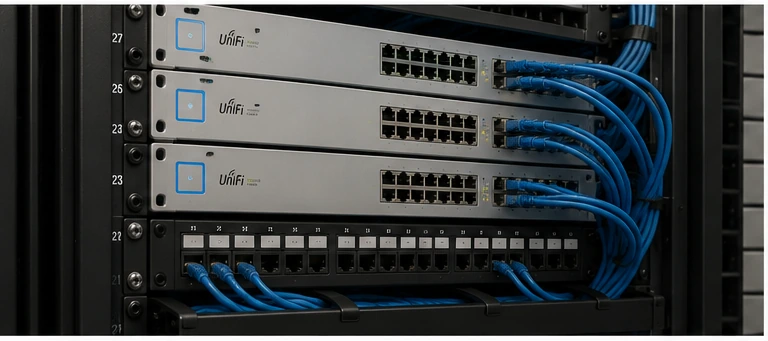
UniFi IDF/MDF architecture for commercial deployments is the structured foundation that determines whether a building’s surveillance, Wi-Fi, and access control infrastructure scales gracefully or becomes a maintenance burden within two years. 2M Technology designs IDF/MDF cabling and switching architectures for commercial facilities across Texas — from single-floor office buildings to multi-story hospitals, warehouses with distributed IDFs, and multi-building industrial campuses. This guide covers the design decisions that experienced network engineers make before a single cable is pulled: MDF placement, IDF zoning, fiber backbone selection, switching hierarchy, PoE budgeting per closet, and UniFi controller placement strategy.
1. What Is IDF/MDF Architecture — and Why It Matters for UniFi
Correct UniFi IDF/MDF architecture begins with understanding the standard that governs it. In structured cabling design (per TIA-568 and ANSI/TIA-942), the MDF (Main Distribution Frame) is the central aggregation point for a building’s network — where the ISP demark, core routing, primary switching, and NVR/controller hardware typically live. IDFs (Intermediate Distribution Frames) are satellite closets on each floor or zone that connect back to the MDF via fiber and extend the network to endpoints (cameras, APs, access readers, workstations). For UniFi IDF/MDF design, the implications are concrete:
- Cameras, APs, and access readers connect to IDF switches via Cat6 horizontal cabling (max 90m permanent link)
- IDF switches uplink to MDF via fiber (OS2 or OM4) — data only, no PoE across fiber
- The UniFi NVR, UniFi Network Server, and core firewall (Dream Machine Pro or UniFi Enterprise Gateway) live in the MDF
- All camera video streams traverse fiber from IDF to MDF for recording — fiber bandwidth must be sized for peak camera load
- PoE power for cameras comes from the local IDF switch — each closet has an independent PoE budget that must be sized for its device zone
The MDF is the foundation of any UniFi IDF/MDF architecture — everything else in the building connects back to it.
Why UniFi IDF/MDF Architecture Determines Operational Outcomes
Infrastructure engineers understand something that camera installers and IT generalists often don’t: the architecture decisions made before installation day determine whether a commercial system performs reliably in year three or requires costly emergency redesign. UniFi IDF/MDF architecture is not an aesthetic preference — each design choice has a direct operational consequence.
| Architecture Decision | Correct Design Outcome | Poor Design Consequence |
|---|---|---|
| IDF per floor / zone | One IDF outage affects only that zone — other floors stay online | Single centralized closet outage takes down entire facility simultaneously |
| 10G fiber uplinks to MDF | 50 cameras at 2K stream simultaneously without saturation during an incident | 1G uplink saturates when investigators pull multiple streams — system fails exactly when needed |
| UPS at every IDF | Cameras, APs, and access readers survive power flickers and brief outages | Power blink drops all cameras simultaneously — the incident that caused the outage is not recorded |
| Camera VLAN isolation | Compromised camera has no path to workstations or EHR systems | Camera on flat network becomes a pivot point into corporate infrastructure |
| Correct PoE budget per IDF | All cameras power on reliably; 20% headroom for expansion | PoE brownout causes random camera dropouts that appear as camera failures — difficult to diagnose |
| Star topology (each IDF → MDF direct) | One IDF failure does not affect adjacent IDFs; latency is consistent | Daisy-chained IDFs mean one link failure takes downstream IDFs offline |
| Controller in MDF (not workstation) | Network continues to function independently of any user’s computer | Controller goes offline when user reboots their PC — cameras adopt, de-adopt, generate false alerts |
2. MDF Design for UniFi Commercial Deployments
MDF Location Selection
Place the MDF at the building’s network gravity center — typically a basement or first-floor telecom room that is:
- Within 100m fiber run of the farthest IDF (shorter fiber = lower attenuation)
- Climate-controlled (18–24°C ambient, dedicated HVAC circuit preferred)
- Physically secure — locked, access-logged, not shared with janitorial or mechanical equipment
- Accessible to multiple conduit pathways for fiber routing to each building zone
MDF Hardware — Standard UniFi Commercial Stack
| Device | Role | UniFi Model |
|---|---|---|
| Core Gateway/Firewall | WAN termination, routing, IDS/IPS, site-to-site VPN | Dream Machine Pro / Enterprise Gateway XG |
| Aggregation Switch | 10G SFP+ uplinks from all IDFs, NVR uplink, inter-VLAN routing | UniFi Aggregation Switch / Enterprise XG 24 |
| NVR | UniFi Protect recording, camera management | UNVR Pro or Enterprise NVR (ENVR) |
| Patch Panels | Fiber and copper cross-connect | 24/48-port Cat6A + fiber LC panels |
| UPS | Runtime for core stack during power events | APC Smart-UPS or Eaton 5PX (min 10 min runtime at load) |
MDF UniFi IDF/MDF Architecture — Rack Layout
Standard 2M Technology MDF rack order (top to bottom): patch panels → aggregation switch → gateway → NVR → UPS. Keep NVR adjacent to aggregation switch to minimize 10G SFP+ cable length. The UPS at the bottom lowers the rack’s center of gravity for freestanding installations.
3. UniFi IDF Design per Floor or Zone
IDF design determines how many closets are needed and what each one contains — the most underestimated planning step in any UniFi IDF/MDF architecture project.
IDF Zoning Strategy
One IDF per floor is the baseline for multi-story buildings. In large single-floor facilities (warehouses, manufacturing plants), zone IDFs by device density and horizontal run length — place an IDF wherever the 90m Cat6 horizontal link limit would be exceeded from a central point. For a 400,000 sq ft warehouse, this typically means 4–6 distributed IDFs.
IDF Hardware — Standard UniFi IDF Stack
| Device | Role | UniFi Model |
|---|---|---|
| Access Switch | PoE for cameras, APs, access readers in zone | Enterprise 24 PoE or Enterprise 48 PoE |
| Fiber Patch Panel | MDF fiber uplink termination | 6–12 port LC fiber panel |
| Cat6A Patch Panel | Horizontal cable termination | 24 or 48-port Cat6A |
| UPS | IDF runtime during outages | Min 15 min runtime at full PoE load |
Critical design rule: IDF switches must have their SFP+ uplink port connected to the MDF aggregation switch via fiber — never daisy-chain IDFs through each other. Daisy-chained IDFs create single-point-of-failure topology and introduce latency in camera streams traversing multiple hops to reach the NVR.
4. Fiber Backbone Between MDF and IDF
Fiber Type Selection
| Fiber Type | Max Distance (10G) | Best For | Cost |
|---|---|---|---|
| OM4 Multi-mode | 400m at 10G | Intra-building, campus runs under 400m | Lower (uses 850nm VCSEL SFPs) |
| OS2 Single-mode | 10km at 10G | Multi-building campus, long inter-building runs | Higher (uses 1310nm SFPs) |
| OM3 Multi-mode | 300m at 10G | Older installations, short runs only | Not recommended for new installs |
2M Technology specifies OM4 for all intra-building backbone runs and OS2 for all inter-building or campus runs. Never mix fiber types on the same backbone segment — SFPs must match fiber type. Use LC duplex connectors throughout for UniFi SFP+ compatibility.
Fiber Strand Count
Install a minimum of 12-strand fiber between MDF and each IDF — even if current design requires only 2 strands (one pair per 10G link). Dark fiber strands are inexpensive to pull during initial installation and extremely expensive to add later. 12-strand minimum provides: 2 strands for primary 10G uplink, 2 strands for redundant uplink, 8 strands for future expansion (25G, 40G, additional uplinks).
5. UniFi Switch Hierarchy & Selection
Switch hierarchy selection is where UniFi IDF/MDF architecture moves from theory to hardware specification.
UniFi IDF/MDF architecture follows a three-tier switching hierarchy for commercial deployments:
Three-Tier UniFi Switching Hierarchy
Tier 1 — Core (MDF): UniFi Enterprise Gateway XG or Dream Machine Pro → handles routing, firewall, VPN, and WAN failover
Tier 2 — Aggregation (MDF): UniFi Aggregation Switch or Enterprise XG 24 → aggregates all IDF uplinks, provides 10G/25G backbone, inter-VLAN routing offload
Tier 3 — Access (IDF): UniFi Enterprise 24 PoE or Enterprise 48 PoE → delivers PoE++ to cameras, APs, and access readers in each zone
For facilities under 50 total devices, a two-tier design (core/gateway + single access switch layer) is sufficient. The three-tier hierarchy becomes necessary when:
- Multiple IDFs are required (building exceeds single-switch horizontal coverage)
- Inter-VLAN routing load justifies separation from the firewall
- 10G or higher uplink bandwidth is needed between floors or buildings
6. PoE Budget Planning per IDF Closet
Each IDF switch has an independent PoE budget that must be sized for the devices in its zone — not the building total. Typical per-zone PoE loads:
| Zone Type | Typical Device Mix | Estimated PoE Load | Recommended Switch |
|---|---|---|---|
| Office floor (medium) | 12 cameras (5W) + 6 APs (20W) + 8 readers (7W) | ~236W | Enterprise 48 PoE (600W) |
| Warehouse zone | 20 cameras (4–20W mix) + 4 APs (30W) | ~280W | Enterprise 48 PoE (600W) |
| Healthcare floor | 16 cameras (5–20W) + 8 APs (20W) + 12 readers (7W) | ~380W | Enterprise 48 PoE (600W) |
| Small IDF (perimeter) | 8 cameras (4W) + 2 APs (20W) | ~72W | Enterprise 24 PoE (400W) |
Always maintain 20% PoE budget headroom. See our complete PoE budget planning guide for per-device wattage tables and calculation methodology.
7. UniFi Controller Placement in IDF/MDF Architecture
For commercial UniFi IDF/MDF deployments, the controller (UniFi Network Server or the NVR’s built-in Protect/Network application) belongs in the MDF — never in an IDF or on a user’s workstation. Controller placement in the MDF ensures:
- All IDF switches and devices adopt via the local network without WAN dependency
- Camera streams write directly to the NVR on the same aggregation switch (minimizing latency)
- Management VLAN traffic stays on the MDF network segment — not traversing IDF uplinks unnecessarily
- Physical access to the controller is controlled (MDF is locked; workstations are not)
For multi-site deployments, 2M Technology typically deploys one UNVR Pro per site with a centralized UniFi Network Server (UNS) at the primary site MDF, federating all remote sites through site-to-site VPN. This eliminates per-site cloud subscription costs while maintaining centralized visibility.
8. Power & UPS Requirements per Closet
Power and UPS planning is the last step of UniFi IDF/MDF architecture before installation begins — and the most frequently skipped. Every IDF must have a dedicated UPS sized for the full PoE load of its switch plus overhead. A power outage that drops IDF switches simultaneously kills camera recording, Wi-Fi, and access control for that zone — exactly when those systems are most needed.
| Closet Type | Switch PoE Load | Min UPS Runtime | Recommended UPS |
|---|---|---|---|
| IDF — light load | <200W | 15 min | APC Smart-UPS 1500VA |
| IDF — heavy load | 200–500W | 15 min | APC Smart-UPS 3000VA |
| MDF — full stack | 500–1500W | 30 min | Eaton 5PX 3000 or APC SRT5KRMXLT |
9. Industry-Specific IDF/MDF Notes
AC circuits to IDF closets must be on the building’s emergency or UPS-backed panel in healthcare and mission-critical environments. Coordinate with the facility’s electrical engineer during design — adding dedicated circuits after construction is extremely expensive.
Healthcare
Hospital IDF closets must be on emergency power circuits (per NFPA 99 for essential electrical systems). Camera VLANs must not have paths to clinical systems VLANs — configure firewall rules at the MDF aggregation switch. Medical-grade Wi-Fi (802.11r fast BSS transition) should be configured for nurse call and clinical device roaming. See our healthcare deployment guide.
Warehouses & Distribution
Zone IDFs in large warehouses based on dock door clusters, not floor geometry. A 600,000 sq ft distribution center with 8 dock zones benefits from 8 IDFs — one per dock zone — rather than 4 large IDFs serving mixed zones. This limits the blast radius of a single IDF failure and simplifies troubleshooting. See our warehouse deployment guide.
Multi-Building Campus
Between buildings, use OS2 single-mode fiber in armored outdoor-rated conduit. Each building has its own MDF connecting back to a campus core switch. Do not route inter-building fiber through attics or crawlspaces — use underground conduit with appropriate sweep radius. See our fiber backbone planning guide for detailed inter-building design methodology.
UniFi IDF/MDF Architecture — IDF Sizing by Zone Type
| Zone Type | Recommended Switch | Patch Panel | UPS | Fiber to MDF |
|---|---|---|---|---|
| Office floor (standard) | Enterprise 24 PoE (400W) | Cat6A patch panel (24–48 port) | 1× APC Smart-UPS 1500 | 12-strand OM4 to MDF |
| Office floor (dense/high-rise) | Enterprise 48 PoE (600W) | Cat6A patch panel (48 port) | 1× APC Smart-UPS 3000 | 12-strand OM4 to MDF |
| Warehouse zone (per IDF) | Enterprise 48 PoE (600W) | Cat6A + fiber patch panels | 1× Eaton 5PX 2200 | 24-strand OM4 to MDF |
| Healthcare floor | Enterprise 48 PoE (600W) on emergency circuit | Cat6A + fiber | 1× APC Smart-UPS 3000 on emergency | 12-strand OM4 to MDF |
| Small IDF (perimeter) | Enterprise 24 PoE (400W) | 6-port fiber + 24-port Cat6A | 1× APC Smart-UPS 1500 | 12-strand OM4 or OS2 to MDF |
| Guard shack / gatehouse | USW-Pro-8-PoE (65W) | Mini patch panel | 1× APC Back-UPS 900 | 2-strand OS2 armored to MDF |
⚠ Critical Warnings — UniFi IDF/MDF Architecture
Real-World IDF/MDF Deployment Failures — What Goes Wrong Without Proper Architecture
2M Technology regularly inherits surveillance and network systems from facilities that had infrastructure installed without proper IDF/MDF architecture planning. These are the failure patterns we encounter most frequently — and the operational consequences each one produces.
Overloaded MDF — Single-Point Architecture
A 5-story office building with all 200 cameras, 40 APs, and 30 access readers connected to a single ground-floor MDF switch. Total PoE load: 850W. Switch budget: 600W. Result: random cameras and APs dropping offline daily with no pattern. Facilities team replaced 6 cameras before the real cause was identified.
Root cause: No IDF per floor. All devices on one switch exceeding PoE budget.
Uplink Saturation During Incidents
A manufacturing plant IDF serving 40 cameras at 2K connected to the MDF via a single 1G fiber link. Steady-state traffic: 120 Mbps (12% utilization). During a theft investigation, 8 investigators simultaneously pulled video from 5 cameras each at 30 Mbps per stream. Total demand: 1,200 Mbps. The 1G link saturated completely — footage was unviewable for 4 hours during the active investigation.
Root cause: 1G copper uplink instead of 10G fiber; no bandwidth headroom for concurrent access.
No UPS at IDF — Cameras Drop During Incidents
A distribution warehouse experienced a loading dock vehicle strike that triggered a brief electrical fault in that wing. The IDF switch serving dock cameras had no UPS. All 20 dock cameras dropped for 4 minutes while the switch rebooted. The 4-minute gap in recording — the exact window when the vehicle struck the building — produced footage loss that complicated the insurance investigation.
Root cause: No UPS at IDF. A $400 UPS would have bridged the outage entirely.
Cameras Sharing the Production Network
A healthcare clinic connected 30 cameras to the same flat network as clinical workstations and EHR servers. A routine vulnerability scan revealed one camera running outdated firmware with a known remote code execution vulnerability. Security assessment concluded the camera could have been used as a pivot point into the clinical network. Full network redesign required post-discovery — at 4× the cost of doing it correctly during initial installation.
Root cause: No camera VLAN. Flat network gave every device access to clinical systems.
Overheating IDF Closets
A retail chain’s IDF closets were repurposed janitorial storage rooms with no dedicated HVAC. A 48-port PoE switch generating 400W of heat in a 6×6 ft room with no airflow raised ambient temperature to 52°C — above the 40°C operating limit of the switches. Switch CPUs throttled and eventually entered thermal protection shutdown. Cameras went offline across 3 stores simultaneously during peak holiday season.
Root cause: IDF closet not climate-controlled. Network gear needs dedicated HVAC or ventilation.
Improper Cable Pathways — Forklift Damage
A warehouse camera installation ran Cat6 cable along the base of rack endcaps through the main cross-aisle — in surface-mount J-hooks at 6 ft height. A forklift carrying an extended load clipped the cable bundle in month 3, severing 12 camera runs simultaneously. Re-pulling 12 runs in conduit retroactively cost 3× the original installation labor. The footage gap during the cable repair also fell during a period with an active insurance claim.
Root cause: Surface-mounted cable in active forklift lanes — all industrial cable runs require rigid conduit.
The common thread in every failure above: None of these were camera failures. None were NVR failures. None required replacing a single piece of surveillance hardware. Every one was an infrastructure design failure — and every one was preventable with correct UniFi IDF/MDF architecture planning before installation day.
10. Common IDF/MDF Architecture Mistakes
The most expensive UniFi IDF/MDF architecture mistakes happen before the first cable is pulled — at the design stage.
- Daisy-chaining IDFs: IDF-A uplinked to IDF-B uplinked to MDF creates a single point of failure and adds latency to every camera stream passing through IDF-A
- Underspecifying fiber strand count: Pulling 2-strand fiber to save cost leaves no headroom — add a second 10G link or 25G upgrade later and the conduit must be re-pulled
- No UPS at IDF closets: An IDF switch without UPS drops cameras, Wi-Fi, and door readers simultaneously on a building power blink
- OM3 fiber for new builds: OM3 limits 10G to 300m and 25G to 70m — always specify OM4 minimum for new construction
- Controller on a workstation: UniFi Network Server on a user PC goes offline when the PC is rebooted, updated, or relocated — always run the controller on dedicated hardware in the MDF
- No management VLAN on IDF switches: Switch management interfaces on the default VLAN expose admin access to any network-connected device — move all switch management to VLAN 10
- Insufficient AC circuits in IDF closets: A 48-port PoE++ switch at 600W load requires a dedicated 20A 120V circuit minimum — verify with electrical before design is finalized
The Standards Behind IDF/MDF Placement
IDF and MDF placement in this guide follows ANSI/TIA-568 and TIA-569 from the Telecommunications Industry Association: the horizontal cabling channel is limited to 100 m total (90 m permanent link plus 10 m of patch cords), which is the hard rule that dictates how many IDFs a building needs — every device jack must land within that budget of its telecom room. TIA-569 adds the pathway and room requirements (dedicated space, cooling, power) that keep an IDF serviceable rather than a closet of regret.
UniFi IDF/MDF Architecture Services by 2M Technology
2M Technology designs IDF/MDF structured cabling and switching architectures for commercial facilities across Dallas-Fort Worth and Texas. Our scope includes site survey, IDF zoning, fiber pathway design, switch specification, PoE budget calculation, VLAN architecture, and as-built documentation — delivered before a single cable is pulled.
- UniFi commercial deployments in DFW
- PoE budget planning guide
- VLAN design for commercial security
- Fiber backbone planning guide
Standards reference: TIA-568 Structured Cabling Standard
Frequently Asked Questions
How many IDF closets does a commercial building need for UniFi?
The number of IDFs depends on building size and horizontal cabling distance limits (90m permanent link per TIA-568). A single-floor building under 5,000 sq ft may need only an MDF. A multi-floor office building needs one IDF per floor. A large warehouse may need 4–8 zone IDFs to keep horizontal runs under the 90m limit regardless of floor count. 2M Technology performs a site survey to determine the optimal IDF count before design begins.
Should the UniFi NVR be in the MDF or an IDF?
The NVR belongs in the MDF, connected directly to the aggregation switch via 10G SFP+. Camera video streams traverse fiber from IDF access switches to the MDF aggregation switch, then to the NVR on a direct 10G link. Placing the NVR in an IDF forces all camera traffic from other IDFs to traverse the fiber backbone twice — once to the NVR IDF, and all management traffic traverses a second hop to reach the MDF gateway.
What fiber type should I use between MDF and IDF in a commercial building?
For intra-building backbone runs under 400m, OM4 multi-mode fiber is the standard — it supports 10G with lower-cost 850nm SFP+ modules. For inter-building runs or future-proofing for 25G/40G, OS2 single-mode is recommended. Always pull a minimum of 12 strands regardless of current requirements — dark fiber strands are cheap to install and expensive to add later.
What AC power does a UniFi IDF closet require?
Each IDF closet needs at least one dedicated 20A 120V circuit for the access switch, plus a separate circuit for the UPS. A fully loaded Enterprise 48 PoE switch draws up to 600W (PoE budget) plus ~50W switch overhead — approximately 5.4A at 120V. A UPS sized for the full load adds additional circuit load. In healthcare and mission-critical buildings, IDF circuits should be on emergency power panels.
Does 2M Technology design IDF/MDF architecture as part of a UniFi installation?
Yes. 2M Technology designs the complete structured cabling and switching architecture for every commercial UniFi deployment — including IDF placement, fiber backbone routing, switch selection, PoE budgeting, VLAN design, and UPS sizing. This design work is included in our free site assessment for qualified commercial facilities across Texas.
Related Deployment Guides — Plan the Full System
Every commercial network backbone decision affects every other infrastructure layer. These guides cover the systems each IDF closet supports:
Get an IDF/MDF Architecture Design for Your Facility
- Texas Private Security License B15309
- (214) 988-4302
- sales@2mtechnology.net


