
Home › UniFi Deployment Center › UniFi Access Hub Installation Guide
Proven UniFi Access Hub Commercial Installation Guide | Door Controller for Texas Businesses
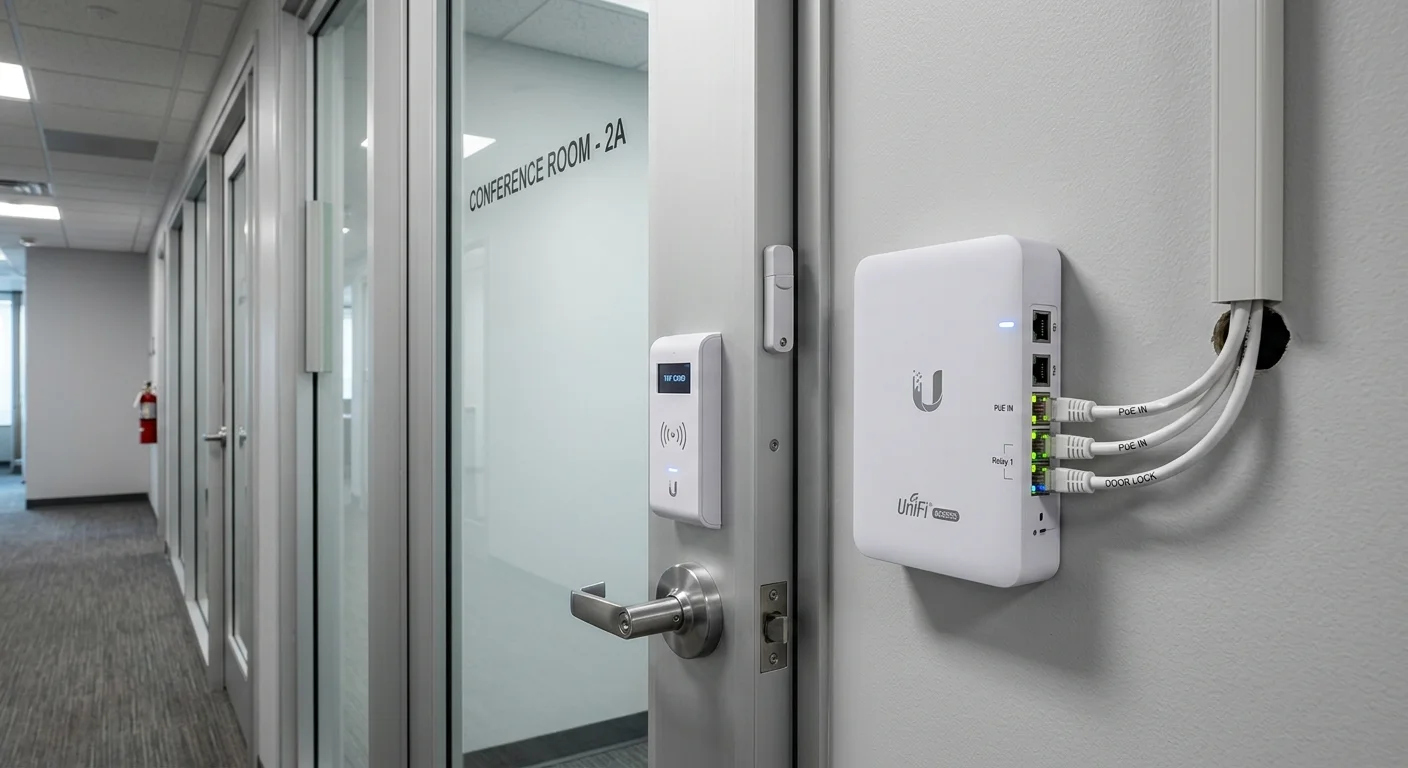
UniFi Access Hub commercial installation replaces traditional card-access control panels with a PoE-powered, cloud-managed door controller that supports NFC cards, Bluetooth mobile keys, and PIN codes from a single device. 2M Technology installs Access Hubs at Texas commercial office buildings, retail facilities, and multi-tenant properties where unified access control — managed from the same UniFi OS console as cameras and networking — reduces operational complexity.

Quick Reference — UniFi Access Hub (UA-Hub)
Access Hub commercial installation — available through 2M Technology
| Doors Controlled | 2 doors per hub |
|---|---|
| Credentials | NFC (ISO 14443 A/B), Bluetooth mobile, PIN, Wiegand, OSDP v2 |
| PoE Requirement | 802.3af, 7.5W |
| IP Rating | IP44 (indoor rated) |
| Lock Output | Dry contact relay, 1A/30VDC |
| Management | UniFi Access (unified with Network and Protect) |
1. What is UniFi Access Hub?
The UniFi Access Hub (UA-Hub) is a PoE-powered door controller managing up to 2 entry/exit points per unit. UniFi Access Hub commercial installation uses Wiegand, OSDP v2, and RS-485 reader interfaces to connect UniFi Access Readers at doors, with a dry-contact relay output controlling electric strikes, magnetic locks, or electrified hardware. The hub manages credentials including NFC (ISO 14443 A/B), Bluetooth mobile keys (via UniFi Access app), and PIN codes — all configured centrally in UniFi Access on the UniFi OS platform.
UniFi Access Hub commercial installation planning begins with mapping how many doors need control at each location and what credential types each user population needs — mobile keys for office staff, card credentials for visitors, PIN for after-hours vendor access.
Unlike traditional access control panels requiring a proprietary server, software license, and dedicated IT maintenance, the Access Hub integrates into the existing UniFi OS environment on the UDM-Pro or Cloud Key. Door schedules, credential assignment, access groups, and audit logs are managed from the same console as cameras and network switches — a single-pane management approach that Texas commercial facilities increasingly require.
For Texas multi-door deployments, each Access Hub controls 2 doors, with multiple hubs daisy-chained back to the UniFi Access Host. A 10-door office deployment requires 5 Access Hubs, connected via Cat5e/6 PoE to an IDF switch, all managed from one UniFi Access console. User credential changes apply to all doors simultaneously without visiting each door controller.
2. Commercial Use Cases in Texas
Matching UniFi Access Hub commercial installation door count, credential requirements, and lock hardware to the specific Texas facility type determines the installation architecture.
Texas Multi-Tenant Office Buildings
Texas office buildings with 10-50 controlled access points — main lobby, elevator lobbies, suite entries, parking structure — deploy multiple Access Hubs managed from a central UniFi Access console. Building management assigns tenant-specific access groups with schedules (tenants access their floor during business hours only) without separate hardware per tenant.
Texas Healthcare and Medical Clinics
Medical facilities in Texas deploy Access Hubs at pharmacy, narcotics storage, clinical areas, and server rooms. The mobile key credential eliminates physical card management for clinical staff who frequently lack pockets or hands for card access. Access logs in UniFi Access provide HIPAA-compliant audit trails of who accessed controlled areas and when.
Texas Retail and Mixed-Use Properties
Texas retail properties with stockroom, loading dock, and employee-only area access requirements deploy Access Hubs for keyless access control without traditional key management. Temporary access codes for delivery contractors are generated from the UniFi Access console and expire automatically after the authorized delivery window.
3. Technical Specifications
UniFi Access Hub commercial installation technical specifications from Ubiquiti’s published Access Hub datasheet, verified in Texas commercial access control deployments by 2M Technology.
| Specification | Value | Commercial Note |
|---|---|---|
| Doors Controlled | 2 doors per hub (entry + exit per door) | Scale with additional hubs: 5 hubs for 10 doors |
| Reader Interface | Wiegand (26-bit and 34-bit), OSDP v2, RS-485 | Compatible with HID, AWID, and other Wiegand-format readers |
| Credential Types | NFC (ISO 14443 A/B), Bluetooth LE mobile key, PIN, HID ProxCard II | Multiple credential types per user — card plus mobile plus PIN |
| Lock Output | Dry contact relay, 1A/30VDC | Drives electric strike (fail-secure) or magnetic lock (fail-safe) |
| Door Sensor | Input for door position sensor (normally closed or normally open) | Reports door held open, forced open, and tamper events |
| REX Input | Request-to-exit sensor input per door | Allows exit without credential when motion or button detected |
| PoE Requirement | 802.3af, 7.5W | Low wattage — does not significantly impact IDF switch PoE budget |
| IP Rating | IP44 (splash-resistant, indoor rated) | Install inside door frame or utility space — not exposed outdoors |
| Tamper Detection | Yes — alert on unauthorized removal | Alerts sent via UniFi Access notification when hub is tampered |
| Management | UniFi Access application on UniFi OS or Cloud Key | Same management platform as cameras and networking |
4. Installation Requirements
UniFi Access Hub commercial installation in Texas commercial buildings requires door hardware selection, cable routing, and lock power supply planning in addition to network infrastructure — 2M Technology coordinates all four during the design phase.
| Requirement | Specification |
|---|---|
| Network Cabling | Cat5e or Cat6 to each hub from PoE-capable IDF switch; max 100m per run |
| PoE Source | 802.3af switch port, 7.5W per hub; standard PoE — no PoE+ required |
| Lock Wiring | 18-22 AWG 2-conductor from hub relay output to lock hardware; separate power supply required for 12V/24V locks |
| Lock Power | External 12VDC or 24VDC power supply for electric strike or mag lock; hub relay switches the lock circuit |
| Reader Wiring | 22 AWG 6-conductor (Wiegand) or Cat5e (OSDP) from hub to each reader; max 150m for OSDP, 100m for Wiegand |
| Door Sensor | 2-conductor wire from door contact sensor to hub input; verify NC (normally closed) or NO (normally open) type |
| REX | 2-conductor from exit button or PIR motion detector to REX input on hub |
| Host Device | UniFi OS device (UDM-Pro, Cloud Key Gen2 Plus) on the same network for hub adoption and management |
5. UniFi Ecosystem Integration
UniFi Access Hub commercial installation integrates with cameras for visual access verification and with the UniFi network for VLAN-isolated access control traffic — 2M Technology configures all three layers on every Texas commercial access project.
The Access Hub integrates with UniFi Protect cameras for visual verification of access events — a door unlock event in Access automatically clips the nearest camera’s footage at that timestamp in Protect, creating a linked visual audit trail without manual camera review. 2M Technology configures camera-to-door event linking during the commissioning phase of every Texas access control deployment.
For Texas multi-site deployments, UniFi Access manages credentials centrally across all sites from a single console. An employee’s mobile key credential issued for the Dallas office can be extended to the Fort Worth location with a single policy change — without visiting either site or reprogramming any hardware. 2M Technology maintains the credential database and access group policies as part of ongoing Texas commercial access management services.
6. UniFi Access Hub vs Commercial Access Control Alternatives
Comparing UniFi Access Hub commercial installation against traditional commercial access control systems highlights the total cost advantage when VMS licensing and proprietary server requirements are eliminated.
| Feature | UniFi (2M Technology) | Lenel S2 NetBox | Bosch B901 Series |
|---|---|---|---|
| Doors per Controller | 2 (expandable) | Up to 16 (with sub-panels) | Up to 8 (B901 panel) |
| Mobile Keys | Yes — UniFi Access app | Yes — Lenel Mobile | Requires third-party reader |
| NVR Integration | Native UniFi Protect integration | S2 NetBox VMS — separate license | Bosch VMS — separate platform |
| Management License | Included — UniFi OS | Per-door license required | Bosch BIS — per-seat license |
| Cloud Management | Yes — UniFi Cloud portal | Yes — S2 Cloud (license) | Limited cloud functionality |
| PoE Powered | Yes — 802.3af (7.5W) | No — requires 12/24V power supply | No — separate power required |
| 5-Year License Cost | None | -,000 per door | -,200 per door |
7. Common UniFi Access Hub Installation Mistakes
Incorrect Lock Type Selection
The Access Hub relay output switches a dry contact — it does not supply power to the lock. Connecting a 12V electric strike directly to the hub relay without an external power supply destroys the relay and the lock. 2M Technology specifies the correct lock type (fail-secure electric strike vs fail-safe magnetic lock), lock voltage (12V vs 24V), and external power supply for every door during the installation design phase.
Installing Hub Outdoors Without Enclosure
The Access Hub is rated IP44 — suitable for sheltered indoor installation only. Installing it in an outdoor enclosure without weatherproofing (exterior doors, covered parking) exposes the hub to Texas summer heat and humidity cycles that exceed the IP44 rating. 2M Technology installs Access Hubs inside door frames, above ceiling tiles, or in NEMA-rated enclosures for all Texas exterior door access control projects.
Not Configuring Door Held-Open Alerts
Without door held-open alerts configured, a propped door at a controlled Texas commercial access point creates a security gap that goes unnoticed until someone manually checks. 2M Technology configures held-open alerts with a 30-60 second threshold on every door during commissioning, sending real-time notifications to the facility manager’s mobile device when a controlled door is propped.
8. Frequently Asked Questions
UniFi Access Hub commercial installation questions from Texas facility managers, property managers, and security directors — answered with specific values from UniFi Access installations.
How many doors can one UniFi Access Hub control?
Each Access Hub controls 2 doors (with entry reader, exit reader/REX, door sensor, and lock relay for each door). For larger Texas commercial deployments, multiple hubs are installed and managed from a single UniFi Access console. A 20-door office building requires 10 Access Hubs. All hubs are adopted by the same UniFi OS host device and appear in a single Access management interface.
Can UniFi Access Hub work with existing HID or AWID card readers?
Yes. The Access Hub supports Wiegand 26-bit and 34-bit interfaces, compatible with most HID ProxCard, AWID, and similar Wiegand-format card readers. If Texas facilities have existing HID readers installed at doors, the Access Hub can replace the legacy controller while retaining the existing readers and employee card credentials — reducing re-carding costs for large deployments.
What happens to door access if the network goes down?
The Access Hub stores up to 500,000 credential records locally. If the network connection to the UniFi Access host is interrupted, the hub continues to grant or deny access based on its locally cached credential and schedule data. Door access is not interrupted by network outages. Access logs are synced back to the host when connectivity is restored.
Does UniFi Access Hub support Apple Wallet or Google Wallet mobile keys?
Currently, UniFi Access mobile keys use the proprietary UniFi Access app (iOS and Android) via Bluetooth LE. Apple Wallet and Google Wallet integration is not supported in the current platform. For Texas commercial deployments requiring card system interoperability or wallet-based credentials, 2M Technology evaluates the specific requirement and may recommend a hybrid approach using OSDP-connected readers.
How is the Access Hub powered?
The Access Hub is powered via standard PoE (802.3af, 7.5W) from any PoE-capable switch port — the same Cat5e/6 cable that provides network connectivity also powers the hub. No separate power supply is required for the hub itself. The lock hardware (electric strike or magnetic lock) requires a separate 12VDC or 24VDC power supply connected to the hub relay output.
Related Deployment Guides — Plan the Full System
Install UniFi Access Hub at Your Texas Facility
- Texas Private Security License B15309
- (214) 988-4302
- sales@2mtechnology.net


