
Home › UniFi Deployment Center › UniFi Warehouse & Distribution Deployment Guide
UniFi Deployment Guide for Warehouses & Distribution Centers
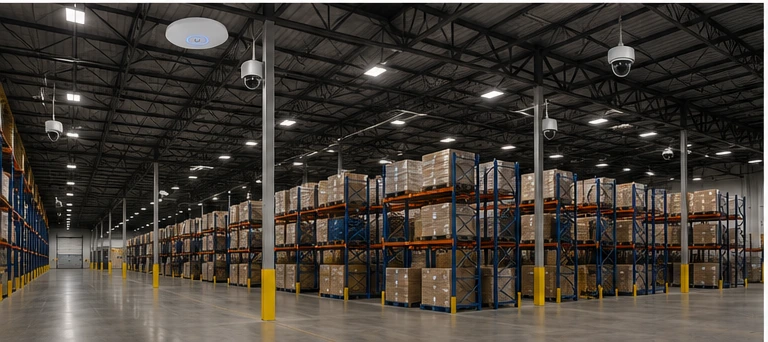
UniFi warehouse deployment for distribution centers and logistics facilities requires a unified approach to cameras, Wi-Fi, access control, and network infrastructure. This guide covers the complete system design 2M Technology engineers for Texas warehouse clients. UniFi deployment for warehouses and distribution centers in Texas requires coordinating four systems that most vendors treat separately: surveillance cameras, enterprise Wi-Fi for WMS and forklift operations, dock door access control, and the network infrastructure that ties them together. 2M Technology designs and installs complete UniFi warehouse systems across Dallas-Fort Worth, Houston, and North Texas — from 50,000 sq ft regional fulfillment centers to 1M+ sq ft distribution hubs. This guide covers the full deployment architecture.
1. Warehouse Deployment Overview — What a Complete UniFi System Covers
A complete UniFi warehouse deployment for distribution centers integrates four subsystems under a single management platform (UniFi Network + UniFi Protect + UniFi Access):
Surveillance (UniFi Protect)
- Dock door cameras (LPR + loading)
- Aisle and floor coverage
- Perimeter and yard
- Gate entry LPR
- Office and break room
Wi-Fi (UniFi Network)
- WMS terminal connectivity
- Forklift-mounted scanners
- Handheld barcode scanners
- Employee corporate Wi-Fi
- Carrier/contractor SSID
Access Control (UniFi Access)
- Employee entrance
- Server room / IT closet
- Controlled dock access
- Manager office areas
- Visitor management
Network Infrastructure
- IDF/MDF structured cabling
- PoE switching per zone
- Fiber backbone between IDFs
- VLAN segmentation
- Gateway & firewall
The camera layer of any UniFi warehouse deployment covers six distinct zones, each with different coverage requirements.
2. Camera System Design for Warehouses
Warehouse camera placement requires coverage at multiple heights and positions. See our dedicated warehouse camera placement guide for detailed geometry and spacing calculations. Summary of the standard deployment pattern 2M Technology uses:
| Zone | Camera | Quantity Guidance | Purpose |
|---|---|---|---|
| Dock door exterior | AI Pro (LPR) | 1 per door | Vehicle ID, driver face, plate capture |
| Dock door interior | G5 Pro or G5 Dome | 1 per door | Loading/unloading activity capture |
| Aisle intersections | AI 360 | Every other intersection | 360° floor awareness at ceiling height |
| Rack endcaps | G5 Dome or AI Turret | Every other endcap | Identification-quality aisle coverage |
| Truck yard | G6 PTZ | 1–2 per yard | Active yard monitoring, trailer tracking |
| Gate entry | AI Pro (LPR) | 1 per lane | Vehicle authorization logging |
| Perimeter fence | G5 Bullet | Every 50–60 ft | After-hours intrusion detection |
Typical camera count: A 300,000 sq ft distribution center with 20 dock doors typically requires 55–80 cameras total. 2M Technology sizes each UniFi warehouse deployment based on actual site survey — not per-square-foot estimates.
3. Wi-Fi for WMS & Forklift Operations
Warehouse management system (WMS) Wi-Fi is operationally critical — a scanner that drops connection during a pick or put-away transaction creates inventory errors, productivity loss, and operator frustration. The three most important configuration elements:
- AP density sized for loaded racks, not open floor: Full pallet loads attenuate signal by 5–12 dB per rack row. Size AP count for full-occupancy conditions, not empty building RF surveys. See our warehouse Wi-Fi design guide for density calculations.
- 802.11r fast roaming on WMS SSID: Forklifts moving at 10 mph cross AP boundaries every 15–30 seconds. Without fast BSS transition, each boundary crossing causes a 300ms+ reconnection that breaks WMS transactions. Enable 802.11r in UniFi Network on the WMS SSID.
- Non-DFS channels for scanner SSIDs: DFS radar detection pauses (up to 60 seconds) cause complete WMS disconnection. Assign channels 36–48 to all WMS/scanner SSIDs — never use DFS channels (52+) for operational Wi-Fi.
4. Access Control at Dock Doors & Controlled Entry
Access control at dock doors strengthens every UniFi warehouse deployment by adding accountability data to the camera record. UniFi Access integrates door control with UniFi Protect camera events — a door forced open outside scheduled hours triggers a Protect alert with the camera view of that door. Warehouse access control priorities:
- Employee entrance: NFC card or mobile credential reader with anti-passback — prevents tailgating at shift change when dozens of employees enter simultaneously
- Dock control doors: Interior dock-side doors (warehouse floor to dock apron) on Access Hub control — limits floor worker access to active dock positions only during carrier arrivals
- IT and server rooms: Access reader with PIN + card two-factor for network infrastructure areas
- Fail-secure vs. fail-safe: Emergency exit doors must be fail-safe (unlock on power loss) per fire code. Controlled interior doors should be fail-secure (remain locked on power loss) — UPS-backed Access Hubs maintain this behavior during brief outages.
5. NVR & Storage Architecture
Storage sizing for warehouse deployments depends on dock door recording mode. 2M Technology typically recommends continuous recording for dock door cameras (where load discrepancies are most frequent and footage has direct financial value) and motion-triggered recording for general floor and perimeter cameras.
| Deployment Size | Camera Count | Recommended NVR | Storage (30-day) |
|---|---|---|---|
| Small (5–10 dock doors) | 20–35 cameras | UNVR (4-bay) | 8–16 TB usable |
| Medium (10–20 dock doors) | 40–80 cameras | UNVR Pro (7-bay) | 20–48 TB usable |
| Large (20+ dock doors) | 80–200+ cameras | Enterprise NVR (ENVR) | 48–150+ TB usable |
For technical specifications on all UniFi NVR platforms, see: UniFi camera and NVR specifications — ui.com
6. Network & VLAN Design for Warehouses
Network segmentation in a UniFi warehouse deployment isolates WMS traffic from surveillance and guest devices — protecting operational continuity. Warehouse networks require 5–6 VLANs to properly segment operations, security, and third-party access:
| VLAN | Devices | Internet |
|---|---|---|
| VLAN 10 — Management | Switches, NVR, controller | IT staff only |
| VLAN 20 — Cameras | All UniFi cameras | Blocked |
| VLAN 30 — Access Control | Door readers, hubs | Blocked |
| VLAN 40 — WMS / Operations | Forklifts, scanners, WMS servers | WMS cloud only |
| VLAN 50 — Corporate | Employee laptops, office Wi-Fi | Full access |
| VLAN 60 — Contractor/Guest | Carrier tablets, visitor devices | Internet only |
See our complete VLAN design guide for firewall rule sets and inter-VLAN routing recommendations.
7. PoE & IDF Planning for Large Warehouse Footprints
PoE and IDF planning for a large UniFi warehouse deployment must account for distributed closets, forklift zones, and peak camera load simultaneously.
Large warehouses require distributed IDF closets to keep horizontal cable runs under the 90m TIA-568 limit. 2M Technology zones IDF placement by dock door cluster — one IDF per 8–12 dock doors is a common pattern that aligns camera, reader, and AP cable runs with the dock zone they serve. For PoE budget planning: each dock door zone with 2 cameras + 1 reader + 2 APs draws approximately 80–120W. An Enterprise 48 PoE switch (600W budget) covers 5–7 dock door zones with significant headroom for perimeter cameras. See our PoE budget planning guide for detailed calculations.
Fiber backbone between IDFs and the MDF (where the NVR lives) must support peak camera stream aggregate. A dock zone with 15 cameras at 2K generates approximately 75–150 Mbps peak — easily within a single 10G SFP+ uplink, but verify total aggregate for zones with 4K cameras. See our fiber backbone planning guide and IDF/MDF architecture guide.
8. UniFi vs. Competitors for Warehouse Deployments
The competitor comparison in any UniFi warehouse deployment reveals clear advantages in total cost and platform integration.
| Factor | UniFi (Ubiquiti) | Cisco Meraki | Verkada |
|---|---|---|---|
| Platform integration | Camera + Wi-Fi + Access unified | Network only; cameras separate | Camera + Access; no Wi-Fi |
| Cloud dependency | Fully on-premises capable | Cloud-required (license) | Cloud-required (subscription) |
| Per-camera cost | $150–$800 hardware only | $300–$1,500 + annual license | $400–$1,200 + subscription |
| WMS Wi-Fi (roaming) | 802.11r, manual channel control | Strong (Cisco WLC heritage) | No Wi-Fi product |
| NDAA compliance | Yes | Yes | Yes |
UniFi Warehouse Deployment — NVR Sizing Quick Reference
| Facility Size | Dock Doors | Approx. Camera Count | Recommended NVR | Storage (30-day motion) |
|---|---|---|---|---|
| Small (50k–150k sq ft) | 4–10 doors | 20–40 cameras | UNVR 4-bay | 8–16 TB usable |
| Medium (150k–400k sq ft) | 10–20 doors | 40–80 cameras | UNVR Pro 7-bay | 20–48 TB usable |
| Large (400k–1M sq ft) | 20–40 doors | 80–150 cameras | Enterprise NVR (ENVR) | 48–100 TB usable |
| Campus / multi-building | 40+ doors | 150–300+ cameras | Multiple ENVRs or multi-NVR | 100+ TB; contact 2M for design |
⚠ Critical Warnings — UniFi Warehouse Deployments
9. Common Warehouse UniFi Deployment Mistakes
- Designing Wi-Fi on an empty warehouse survey — signal propagation changes dramatically when racks are loaded; always design for full occupancy
- Single camera per dock door — one camera cannot capture both the approaching truck/plate and the loading activity inside; two cameras per door is the minimum for accountability
- WMS and guest devices on the same SSID — high guest client count degrades scanner roaming performance and creates security exposure
- No UPS at IDF closets — a power blink drops cameras, access readers, and Wi-Fi simultaneously; each IDF closet requires local UPS
- Surface-run cable in forklift aisles — any cable below 20 ft in an active forklift lane must be in overhead conduit; surface cables will be destroyed
Frequently Asked Questions
How much does a complete UniFi warehouse system cost?
A complete UniFi warehouse deployment including cameras, Wi-Fi, access control, networking hardware, and professional installation typically ranges from $40,000–$150,000+ depending on facility size, camera count, and infrastructure complexity. A 150,000 sq ft facility with 10 dock doors, 40 cameras, 20 APs, and structured cabling typically runs $45,000–$75,000 installed. 2M Technology provides detailed pricing after a free site assessment — contact us for a facility-specific quote.
Can UniFi integrate with our existing WMS system?
UniFi Protect does not directly integrate with WMS platforms (Manhattan Associates, Blue Yonder, SAP EWM, etc.) — they operate independently. UniFi provides the Wi-Fi infrastructure that WMS devices connect to, and UniFi Protect provides camera coverage of the same areas. The value is operational: when a WMS discrepancy occurs, operators pull the Protect camera footage for the dock door and time window in question. The systems are complementary, not integrated at the software level.
Does UniFi support license plate recognition (LPR) for truck gates?
Yes. UniFi Protect includes LPR functionality on AI-class cameras (AI Pro, AI LPR, G6 PTZ). Configure an LPR zone in Protect pointing at the vehicle lane at the gate stop point. Protect logs all plate reads with timestamp, vehicle direction, and a linked camera clip. Vehicle whitelist management (authorized carriers) can be configured within Protect. For automated gate control based on plate reads, integration with a third-party gate system via API or relay is required — contact us for facility-specific integration options.
Does 2M Technology install UniFi in warehouses across Texas?
Yes. 2M Technology installs complete UniFi warehouse systems throughout Texas including Dallas-Fort Worth, Allen, Denton, Mansfield, and surrounding communities. Our warehouse scope includes site survey, coverage design, structured cabling, hardware installation, VLAN configuration, UniFi Protect commissioning, and post-installation testing. Contact us for a free site assessment.
Related Deployment Guides — Plan the Full System
A complete UniFi warehouse deployment connects cameras, Wi-Fi, access control, and network infrastructure. These guides cover each layer:
Plan Your Warehouse UniFi Deployment
- Texas Private Security License B15309
- (214) 988-4302
- sales@2mtechnology.net


