
Home › UniFi Deployment Center › UniFi UNVR Pro Storage Sizing Guide
UniFi UNVR Pro Storage Sizing & Deployment Guide
1. Platform Overview
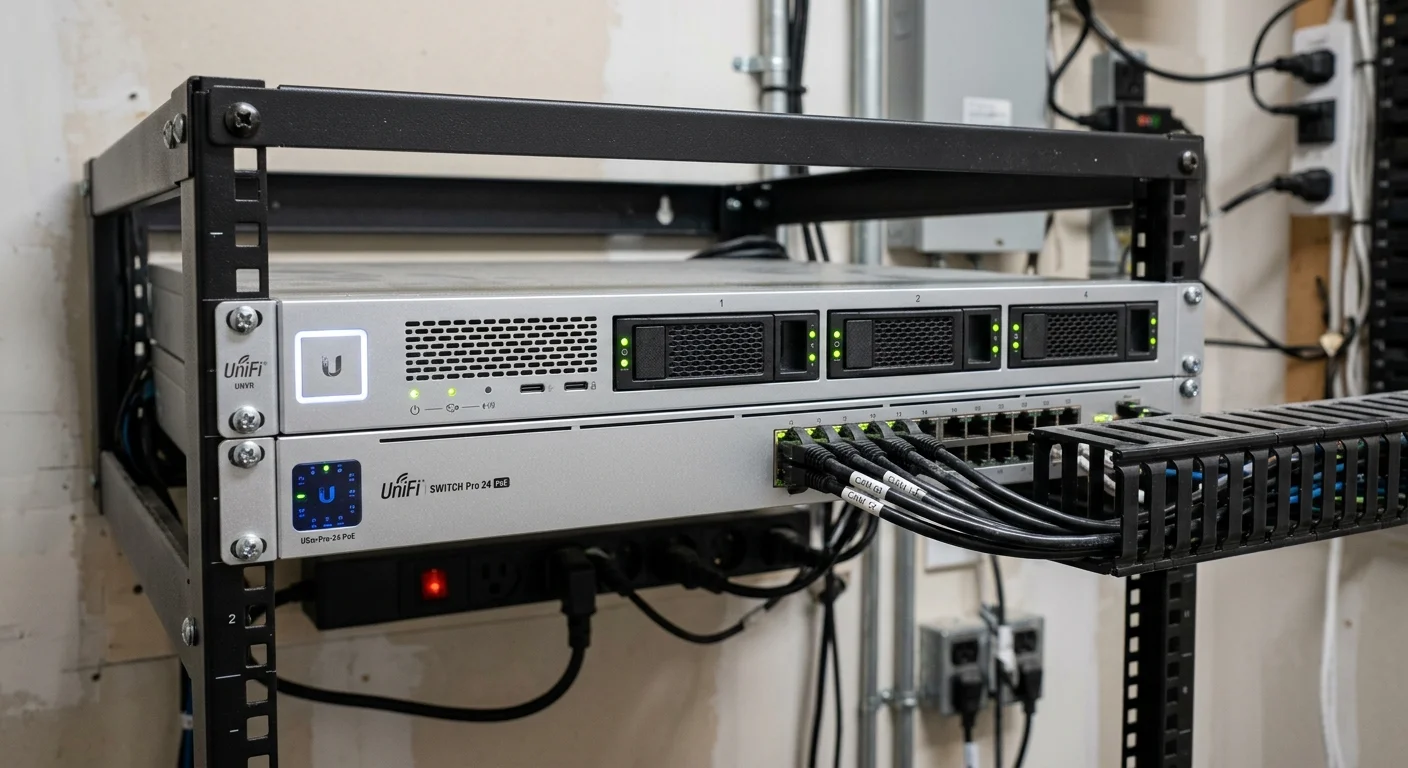
UniFi UNVR Pro storage deployment sizing determines whether a commercial system has headroom to grow or hits a wall at year two. The UniFi UNVR Pro storage deployment platform is Ubiquiti’s mid-range rackmount NVR — a 2U system with seven drive bays, a 10G SFP+ uplink, and processing headroom for deployments exceeding 50 cameras. It runs UniFi Protect natively and is managed through the same interface as UniFi Network and UniFi Access, making it the standard choice for commercial facilities that need more recording capacity than the 4-bay UNVR but don’t yet need the full 16-bay Enterprise NVR (ENVR).
2M Technology deploys the UNVR Pro as the standard commercial NVR architecture for mid-size commercial facilities across Texas — manufacturing plants with 40–80 cameras, multi-building office campuses, healthcare clinics, and hotel properties where a single NVR platform handles the full camera system with room for expansion.
2. When to Choose the UNVR Pro
Understanding where the UNVR Pro fits in the UniFi NVR lineup prevents the most common UniFi UNVR Pro storage deployment sizing mistakes:
| Scenario | Recommended NVR |
|---|---|
| Up to 30 cameras, mix of 2K/HD | UNVR (4-bay) |
| 30–100 cameras, 2K/4K mix | UNVR Pro (7-bay) ← this guide |
| 100–210 cameras, enterprise campus | Enterprise NVR (ENVR, 16-bay) |
| Small site, up to 24 cameras, desktop | CloudKey+ (UCK-G2-PLUS) |
UniFi UNVR Pro storage sizing decisions should be made before hardware is ordered — not after installation. Choose the UNVR Pro for your multi-camera recording system when: camera count exceeds the UNVR’s 30 2K / 18 4K capacity limit; when 10G uplink connectivity to a core switch is required for high-throughput multi-camera streams; or when storage expansion beyond 4 bays is needed for longer retention periods.
3. Technical Specifications
| Specification | Value |
|---|---|
| Form Factor | 2U Rackmount |
| Drive Bays | (7) 3.5″ HDD bays |
| Network Ports | (1) 10G SFP+ + (1) GbE RJ45 |
| Max Camera Capacity (HD) | ~100 cameras |
| Max Camera Capacity (2K) | ~50 cameras |
| Max Camera Capacity (4K) | ~30 cameras |
| Operating Temperature | 0 to 40°C |
| AC Input | 100–240 V AC, 50/60 Hz |
| Certifications | NDAA, CE, FCC, IC |
Official reference: UNVR Pro Technical Specifications — Ubiquiti
4. Drive Selection & RAID Configuration
Recommended Drive Types
Use NAS/surveillance-rated drives only. Standard desktop drives are rated for 8–10 hours of operation per day — NVR systems run 24/7 and generate continuous read-write loads that will fail consumer drives within months.
- Seagate IronWolf Pro (recommended): 4–20 TB, rated for 300 TB/year workload, 7,200 RPM, 3-year warranty with data recovery service. Our standard specification for commercial UNVR Pro deployments.
- Western Digital Purple Pro: 4–18 TB, ATA streaming optimization for surveillance workloads, 180 TB/year workload rating.
- Seagate Exos (high-performance): Enterprise-grade drives for deployments with high camera counts and continuous recording modes requiring maximum sustained throughput.
RAID Configuration Options
| RAID Level | Usable Capacity (7 × 8 TB) | Drive Failures Tolerated | Use Case |
|---|---|---|---|
| RAID 0 | 56 TB | 0 | Not recommended for production — no redundancy |
| RAID 5 | 48 TB | 1 | Standard commercial — good capacity/redundancy balance |
| RAID 6 | 40 TB | 2 | High-availability environments — tolerates 2 simultaneous failures |
| JBOD (no RAID) | 56 TB | 0 per drive | Maximum storage, individual drive management in Protect |
2M Technology recommends RAID 5 as the standard for commercial UNVR Pro deployments. RAID 6 is appropriate for healthcare, financial, and other environments where uninterrupted recording continuity is a compliance or operational requirement.
5. Storage Sizing Calculator
Use this reference table to estimate storage needs based on camera mix and retention period. Values assume motion-triggered recording at typical commercial motion rates (~30% of day with motion).
| Resolution | Avg Bitrate | 30-Day Storage / Camera | 50-Camera / 30 Days |
|---|---|---|---|
| HD (1080p) | 1–2 Mbps | 80–160 GB | 4–8 TB |
| 2K (2688×1512) | 2–4 Mbps | 160–490 GB | 8–24 TB |
| 4K (3840×2160) | 6–12 Mbps | 500 GB – 1.4 TB | 25–70 TB |
Example Sizing — 50-Camera Commercial Facility:
30 cameras at 2K (motion recording) + 20 cameras at 4K (motion recording) with 30-day retention:
30 × 300 GB = 9 TB + 20 × 900 GB = 18 TB → ~27 TB usable storage required
UNVR Pro with 7× 8 TB drives in RAID 5 = 48 TB usable → comfortable headroom for 30-day retention.
For facilities with continuous recording requirements or longer retention periods (60–90 days), contact 2M Technology for a custom storage architecture review. See our NVR storage sizing calculator guide for detailed methodology.
6. Network & Connectivity
The UNVR Pro includes a 10G SFP+ uplink, making it the right choice for high-camera-count deployments where aggregate camera stream bandwidth approaches or exceeds 1 Gbps. Network recommendations:
- Connect via 10G SFP+: A 50-camera deployment at 2K averaging 3 Mbps generates ~150 Mbps aggregate — within GbE limits, but at peak motion events, burst traffic can approach 500–800 Mbps. The 10G uplink eliminates this bottleneck.
- Core switch: Connect the UNVR Pro 10G SFP+ to an aggregation switch (UniFi Aggregation or Enterprise XG) rather than a standard access switch. This keeps NVR traffic on a high-speed backbone.
- Management access: Configure the UNVR Pro management interface on the management VLAN. Restrict access to authorized administration workstations via firewall rules.
- NVR-to-camera VLAN routing: If cameras are on a dedicated camera VLAN, configure a firewall rule permitting camera VLAN to reach the UNVR Pro’s IP on the management VLAN. Block all other inter-VLAN camera traffic.
7. Rack Installation
- Attach rack ears to UNVR Pro chassis (2U height — verify two open rack units)
- Install cage nuts at appropriate rack U position
- Slide UNVR Pro in and secure with four rack screws
- Install HDDs: release each drive tray, seat the drive with provided screws, re-insert and lock
- Connect 10G SFP+ to core switch using appropriate SFP+ DAC cable or fiber module
- Connect AC power and power on — allow 90 seconds to boot
- Access UniFi Protect at
https://[UNVR-PRO-IP]— follow setup wizard - Configure storage (RAID or JBOD) in Protect storage settings — format drives
- Adopt cameras via the Devices panel — cameras on same L2 network adopt automatically
8. UniFi Protect Configuration
- Storage Management: In Protect → Settings → Storage, set recording mode per camera group (motion, continuous, or scheduled). Set retention periods matching your compliance requirements — healthcare often requires 30–90 days; retail typically 14–30 days.
- Smart Detection: Enable smart detection for cameras with relevant AI features. Configure detection zones to limit trigger areas and reduce false-positive storage consumption.
- Remote Access: For facilities with security staff monitoring from mobile, configure UniFi Cloud remote access — or deploy a site-to-site VPN for fully on-premises remote access without cloud dependency.
- NVR Updates: For every Protect storage infrastructure deployment, schedule firmware updates during low-activity hours (overnight). UNVR Pro supports update scheduling in UniFi OS settings.
9. Industry-Specific Notes
Healthcare Facilities
For HIPAA-regulated environments, disable cloud sync in UniFi Protect, operate entirely on-premises, and restrict NVR access to authorized security personnel only. Consult with compliance counsel on video retention periods — requirements vary by state and facility type. See our healthcare deployment guide.
Warehouses & Logistics
Warehouses with 50–80 cameras at 2K are the sweet spot for UNVR Pro deployment. Motion rates in active warehouses are high — consider continuous recording for dock cameras (where insurance and liability documentation is critical) and motion-triggered recording for general floor coverage to manage storage utilization. See our warehouse deployment guide.
Multi-Site Deployments
For clients with multiple facilities each running an UNVR Pro, UniFi Protect supports multi-site management through a single UniFi Cloud account or a central UniFi Network Server (UNS) deployment. This enables centralized viewing of all sites from a single interface without requiring VPN access to individual sites.
UniFi UNVR Pro Storage Sizing — Quick Reference
| Camera Count | Resolution | Recording Mode | Retention | Min Usable Storage | Drive Configuration |
|---|---|---|---|---|---|
| 20 cameras | 2K | Motion | 30 days | ~6 TB | 7× 2TB RAID 5 = 12TB usable |
| 30 cameras | 2K | Motion | 30 days | ~9 TB | 7× 3TB RAID 5 = 18TB usable |
| 50 cameras | 2K | Motion | 30 days | ~15 TB | 7× 4TB RAID 5 = 24TB usable |
| 30 cameras | 4K | Motion | 30 days | ~27 TB | 7× 6TB RAID 5 = 36TB usable |
| 50 cameras | 2K | Motion | 60 days | ~30 TB | 7× 6TB RAID 5 = 36TB usable |
| 50 cameras | 2K | Continuous | 14 days | ~38 TB | 7× 8TB RAID 5 = 48TB usable |
⚠ Critical Warnings — UniFi UNVR Pro Storage Sizing & Deployment
Never use consumer or desktop HDDs in a production NVR. Desktop drives are rated for 8–10 hours of operation per day. NVR workloads run 24/7 with continuous read-write cycles — consumer drives fail within 12–18 months. Specify NAS or surveillance-rated drives (Seagate IronWolf Pro, WD Purple Pro) exclusively.
Never configure RAID 6 in a production surveillance environment. A single drive failure in RAID 0 loses all recordings on that array — permanently. RAID 5 tolerates one drive failure; RAID 6 tolerates two. Use RAID 5 as the minimum for any UniFi UNVR Pro storage deployment in commercial environments and RAID 6 for compliance-sensitive environments.
Never run the UNVR Pro without UPS protection. Unplanned power loss during an active write cycle corrupts NVR storage — potentially destroying all recorded footage. Size the UPS for 100% of NVR power draw with a minimum 15-minute runtime.
Connect via 10G SFP+ when managing 30 or more cameras. At 50 cameras averaging 3 Mbps each, peak burst traffic approaches 500 Mbps — saturating a 1G GbE uplink. The UNVR Pro’s 10G SFP+ uplink eliminates this bottleneck; use it.
Never exceed 80% of the UNVR Pro camera capacity limit. Processing degradation affects all cameras on the system — not just the cameras added beyond the limit. Size the NVR with 20% headroom above current camera count for future expansion and AI analytics overhead.
10. Common Installation Mistakes
- Using consumer or desktop HDDs: Standard HDDs will fail under 24/7 NVR workloads within 12–18 months — use NAS-rated surveillance drives (IronWolf Pro, WD Purple Pro) exclusively
- Skipping RAID configuration: A single drive failure in JBOD mode loses only one drive’s recordings, but without RAID, the NVR continues operating on remaining drives — this is acceptable for non-critical footage but not for compliance-sensitive environments
- Connecting via GbE when 50+ cameras are present: At 50 cameras averaging 3 Mbps each, peak burst traffic can saturate a 1G link — use the 10G SFP+ uplink
- No UPS protection: Unplanned power loss during a drive write can corrupt NVR storage — always install UNVR Pro behind a UPS with at least 10 minutes of runtime at the NVR’s power draw
- Exceeding camera capacity limits: UniFi Protect enforces camera limits — do not attempt to connect more cameras than the platform supports; performance degradation affects all cameras on the system
Official Specifications This Guide Is Built On
Capacity and throughput figures here follow Ubiquiti’s official specifications for the UNVR Pro: 7 hot-swap 3.5″ bays with hardware RAID, purpose-built for continuous multi-camera recording. Two planning rules from the spec sheet worth repeating: usable capacity is always less than raw capacity once RAID redundancy is applied, and recording throughput — not just disk size — sets the ceiling on how many high-bitrate cameras one unit can ingest. Size against both before ordering drives.
UniFi UNVR Pro Storage Deployment & Sizing by 2M Technology
Frequently Asked Questions
How much storage does a 50-camera UNVR Pro deployment need?
A 50-camera mix of 2K cameras on motion recording with 30-day retention requires approximately 8–24 TB of usable storage. The UNVR Pro with 7× 8 TB drives in RAID 5 provides 48 TB usable — ample for this deployment with room for extended retention or expansion to additional cameras. Higher bitrate recording modes or 4K cameras increase storage requirements proportionally.
Can drives be replaced while the UNVR Pro is running?
The UNVR Pro supports drive replacement — consult Ubiquiti’s drive replacement procedure for your firmware version. In RAID 5 or RAID 6 configurations, a failed drive can be replaced and the array rebuilt without powering down the system. Rebuilding a large array (8+ TB drive) can take 12–24 hours, during which recording continues at reduced redundancy. Replace drives promptly when the system reports a failure.
What is the difference between the UNVR and the UNVR Pro?
The UNVR has 4 drive bays and supports up to 60 HD or 18 4K cameras. The UNVR Pro has 7 drive bays and approximately 100 HD or 30 4K camera capacity, with a 10G SFP+ uplink instead of the UNVR’s 10G SFP+ combined with GbE only. The UNVR Pro is the correct choice when camera count or storage requirements exceed the UNVR’s limits, or when 10G backbone connectivity is needed for high-throughput environments.
Does 2M Technology handle UNVR Pro sizing as part of a deployment?
Yes. 2M Technology performs complete surveillance retention planning and NVR design as part of every commercial engagement — including camera mix, resolution, recording mode, retention period, and RAID overhead. We specify the correct NVR model and drive configuration, order the hardware, install and configure the system, and test recording integrity before commissioning. Contact us for a free site assessment.
Related Deployment Guides — Plan the Full System
Other factors must be taken into consideration when estimating UniFi UNVR Pro storage needs. These guides provide more context:
Get a Storage Design for Your Facility
- Texas Private Security License B15309
- (214) 988-4302
- sales@2mtechnology.net


