
Home › UniFi Deployment Center › UniFi Access Reader Commercial Deployment Guide
Proven UniFi Access Reader Commercial Deployment Guide | NFC and Mobile Key Readers for Texas
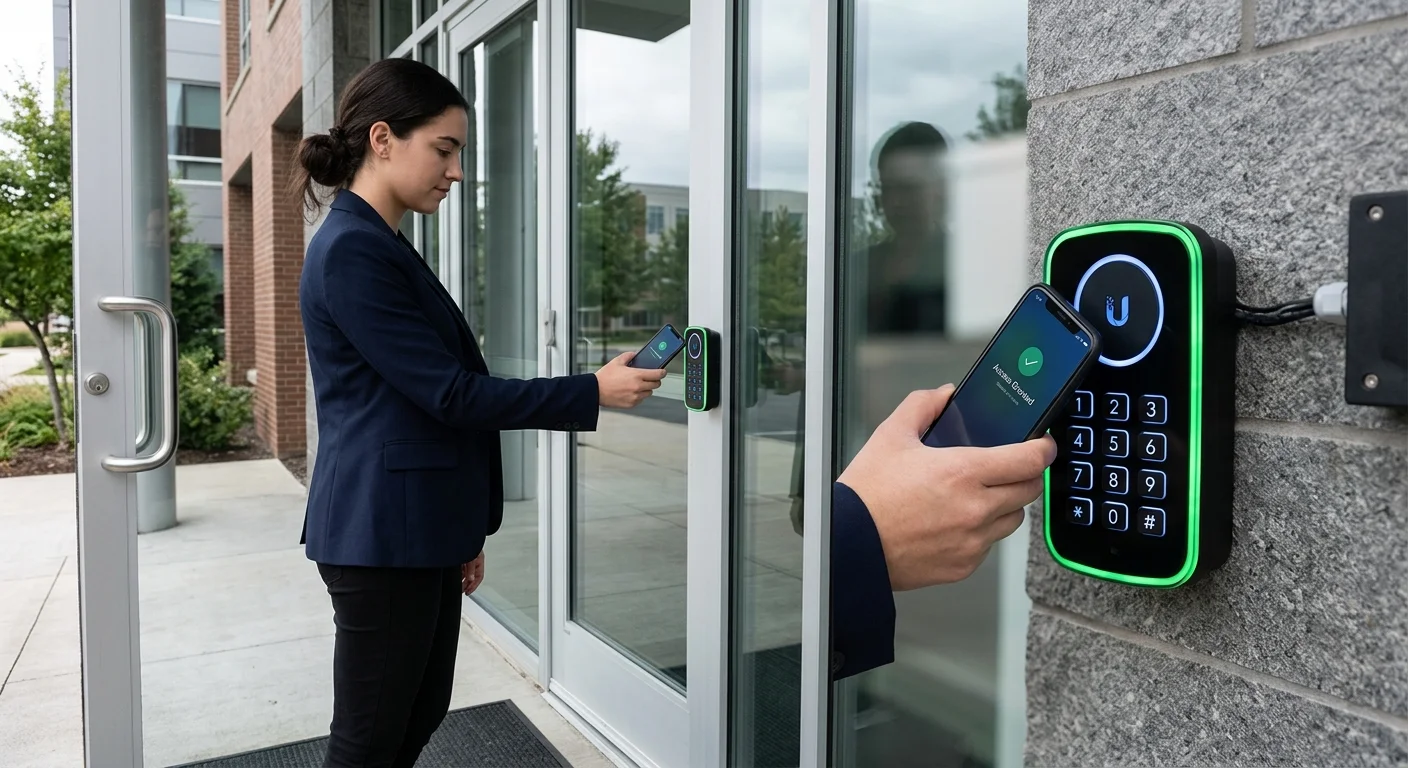
UniFi Access Reader commercial deployment places multi-credential readers at Texas commercial door access points — supporting NFC cards, Bluetooth mobile keys, QR codes, and PIN codes from a single slim-profile device. 2M Technology deploys Access Readers paired with Access Hubs at every controlled door in Texas commercial buildings, retail properties, and multi-tenant facilities where mobile-first credential management is required.

Quick Reference — UniFi G3 Reader Pro (UA-Reader-Pro)
Access Reader commercial deployment — available through 2M Technology
| Credentials | NFC (ISO 14443 A/B), Bluetooth LE, QR code, PIN |
|---|---|
| Card Compatibility | HID ProxCard II, iCLASS, Mifare, DESFire |
| Ratings | IP55 (outdoor rated) |
| Operating Temperature | -40 to +65 degrees C |
| Connection | RS-485 or PoE to Access Hub |
| LED Indicator | Halo LED status ring |
1. What is UniFi Access Reader?
The UniFi Access Reader (G3 Reader Pro, UA-Reader-Pro) is a multi-credential door reader supporting NFC (ISO 14443 A/B), Bluetooth LE mobile keys via the UniFi Access app, QR code scanning, and PIN entry via backlit keypad. UniFi Access Reader commercial deployment connects to UniFi Access Hubs via RS-485 or PoE, with the hub managing credential validation and lock control. The IP55 weatherproof rating allows installation on both interior and covered exterior door frames across Texas commercial facilities.
UniFi Access Reader commercial deployment planning determines which credential types each door needs based on the user population — executive entries may need mobile keys only, while visitor lobbies need both NFC card issuance and host-generated QR codes for one-time access.
The reader is compatible with existing HID ProxCard II, iCLASS, Mifare Classic, and DESFire card formats — allowing Texas facilities to retain existing employee cards from a previous access control system while transitioning to UniFi Access management. This interoperability reduces re-carding costs for large Texas commercial deployments where issuing new cards to 100-500 employees is operationally disruptive.
The LED halo ring provides clear visual feedback: green for granted access, red for denied, blue for Bluetooth connection in progress, and white for standby. In Texas commercial lobbies where visitors self-present credentials without a guard, clear visual feedback reduces failed access attempts and queue buildup at entry points during peak arrival times.
2. Commercial Use Cases in Texas
Selecting the right UniFi Access Reader commercial deployment credential type for each Texas facility door type determines the user experience and security level at each access point.
Texas Office Main Entry and Suite Doors
Texas corporate offices deploy Access Readers at main building entry (mobile key + NFC for employees, PIN for authorized vendors), floor elevator lobby (NFC card or mobile key for tenant employees), and suite entry (mobile key for all staff). The hierarchy of credential types creates layered security without multiple reader models — one Access Reader supports all credential types at each door.
Texas Healthcare and Laboratory Access
Clinical areas in Texas healthcare facilities require quick, touchless access for staff wearing gloves. The Bluetooth mobile key feature allows credential presentation from a phone in a scrub pocket without removing a physical card — a significant usability improvement for clinical staff who access multiple controlled areas per shift. 2M Technology configures auto-unlock on specific readers for staff with clinical credential levels.
Texas Multi-Tenant Commercial Properties
Texas commercial properties with multiple tenants deploy Access Readers at shared building amenities (gym, conference center, parking) with credential access granted per-tenant. Property managers create tenant-specific access groups in UniFi Access, restricting each tenant’s credentials to their leased areas plus shared spaces included in their lease agreement.
3. Technical Specifications
UniFi Access Reader commercial deployment technical specifications from Ubiquiti’s published G3 Reader Pro datasheet, verified in Texas commercial access control installations.
| Specification | Value | Commercial Note |
|---|---|---|
| NFC Support | ISO 14443 A/B (Mifare, DESFire, iCLASS compatible) | Works with most existing commercial NFC card formats |
| Bluetooth | Bluetooth LE (BLE) for mobile key credential | Presents mobile key via UniFi Access app on iOS or Android |
| QR Code | Yes — camera-based QR code scanning | Useful for one-time visitor access or event-based credentials |
| PIN Keypad | Yes — backlit numeric keypad | PIN alone or as second factor with card/mobile key |
| Card Compatibility | HID ProxCard II, iCLASS SE, Mifare Classic, DESFire EV1/EV2 | Interoperable with most legacy Texas access control card systems |
| LED Indicator | Halo LED ring — green/red/blue/white status | Visible from 3-5m for clear access grant/deny feedback |
| IP Rating | IP55 (jet water resistant) | Suitable for covered outdoor entry, lobby, and parking positions |
| Operating Temperature | -40 to +65 degrees C (-40 to +149 F) | Extreme range — handles Texas summer heat at south-facing entries |
| Connection | RS-485 (OSDP) or PoE Ethernet to Access Hub | RS-485 is standard; PoE option for standalone management |
| Anti-Tamper | Yes — tamper detection and alert | Alert sent via UniFi Access when reader is removed or tampered |
4. Deployment Requirements
UniFi Access Reader commercial deployment installation height, angle, and proximity to lock hardware are critical for reliable NFC reads and Bluetooth detection — 2M Technology follows specific reader positioning standards on every Texas project.
| Requirement | Specification |
|---|---|
| Mounting Height | 1.0-1.2m (40-48 inches) above finished floor — standard ADA accessible height |
| Mounting Position | Wall adjacent to door, latch side preferred; minimum 20cm from door frame edge |
| Cabling | 22 AWG 6-conductor for RS-485 (OSDP) connection to Access Hub; max 1,200m RS-485 run |
| Connection | RS-485 OSDP daisy-chain to Access Hub or individual PoE connection; 2M Technology uses RS-485 for multi-reader runs |
| Back Box | Single-gang (US standard) electrical back box; included mounting plate covers US single-gang |
| NFC Range | 5-10cm for NFC card presentation; 30-100cm Bluetooth range for mobile key auto-unlock |
| Environmental | IP55 rated — suitable for covered outdoor entry; avoid direct prolonged sun exposure in Texas summer to protect screen |
5. UniFi Ecosystem Integration
UniFi Access Reader commercial deployment works with the Access Hub as a system — reader validates credential presentation and signals the hub, which controls the lock relay and logs the event in UniFi Access.
The Access Reader connects to the Access Hub via RS-485 OSDP protocol, presenting credentials to the hub for validation against the locally cached credential database. When a credential is presented, the hub validates it against the access schedule for that door and time, actuates the lock relay if access is granted, and logs the event with timestamp, credential ID, and door ID to UniFi Access.
For Texas deployments where the AI 360 or AI Turret camera is positioned at the same door, UniFi Access links the access event timestamp to the camera’s Protect recording. Security staff reviewing an access anomaly can immediately pull the camera clip for that credential presentation without searching manually through Protect’s timeline.
For the complete UniFi Access ecosystem including door controllers, intercoms, and hub architecture, see the UniFi Access Hub Commercial Installation Guide and the UniFi Intercom Commercial Deployment Guide. For the full deployment center resource library, see the UniFi Infrastructure Deployment Center.
6. UniFi Access Reader vs Commercial Alternatives
Comparing UniFi Access Reader commercial deployment against HID and Allegion readers highlights the ecosystem integration advantage when the entire security stack — cameras, access, and networking — uses one management platform.
| Feature | UniFi (2M Technology) | HID RP40 Multiclass Reader | Allegion AD-Series |
|---|---|---|---|
| NFC Support | ISO 14443 A/B multi-format | HID iCLASS, SEOS, DESFire | HID iCLASS, Seos, NFC |
| Mobile Key | Yes — UniFi Access app (BLE) | Yes — HID Mobile Access (separate license) | Yes — Allegion ENGAGE (separate app) |
| QR Code | Yes | No | No |
| IP Rating | IP55 | IP55 | IP55 |
| Management | UniFi Access (included) | PACS server (separate license) | Allegion Mercury Panel required |
| Camera Integration | Native UniFi Protect integration | Requires middleware integration | Requires third-party integration |
| License Cost | None — included | HID Mobile license per user | Allegion license per door |
7. Common UniFi Access Reader Commercial Deployment Mistakes
Mounting at Incorrect Height
Access readers mounted above 1.2m (48 inches) create ADA compliance issues in Texas commercial buildings subject to ADA regulations. Mounting below 0.9m makes the reader difficult to use from a standing position. 2M Technology mounts all Access Readers at 1.0-1.1m (40-44 inches) above finished floor as the standard Texas commercial installation height.
Installing RS-485 Cable Without OSDP Configuration
RS-485 cable without OSDP protocol configuration on both the reader and hub results in no communication between the devices. 2M Technology configures OSDP on both the Access Hub (reader interface) and the G3 Reader Pro during commissioning, verifying the reader appears online in the UniFi Access console before considering the door complete.
No Anti-Passback or Tailgating Controls
Deploying readers without configuring anti-passback (card used to enter but not exit allows re-entry) enables credential sharing where one employee lets multiple individuals in with a single tap. 2M Technology configures anti-passback zones in UniFi Access for Texas commercial deployments where tailgating is a security concern — primarily financial, pharmaceutical, and high-security office environments.
Workforce Credential Workflows: Enterprise Access Lifecycle Management
An access reader is a terminal in a credential management workflow — not a standalone device. The reader’s value depends entirely on how the credential lifecycle is managed: how credentials are issued, modified, suspended, and revoked across the full workforce lifecycle. 2M Technology designs credential workflows as part of every Texas commercial access control deployment, not as an afterthought.
ENTERPRISE CREDENTIAL LIFECYCLE WORKFLOW
==========================================

EMPLOYEE ONBOARDING:
  HR trigger --> IT creates UniFi Access credential
  Credential type: mobile key (app) + NFC backup card
  Access groups: floor level + department zone + common areas
  Effective date: first day of employment
  Time schedule: business hours default (7am-7pm M-F)

EMPLOYEE ROLE CHANGE:
  HR trigger --> Update access group membership
  New group: expanded or restricted zone access
  Immediate effect: no hardware programming required
  Audit log: role change timestamped in Access dashboard

EMPLOYEE TERMINATION:
  HR trigger --> Immediate credential suspension in UniFi Access
  Effect: credential revoked within 60 seconds across all readers
  Physical card: invalidated without retrieval (NFC blacklisted)
  Audit export: last 90 days of access events for records

CONTRACTOR ONBOARDING:
  PM creates temporary credential: specific zones + time window
  Example: 8am-5pm M-F, floors 2-3 only, 30-day duration
  Auto-expiry: credential expires without manual revocation
  Verification: contractor must present valid credential, no tailgating

VISITOR PROCESSING:
  Receptionist generates one-time QR code via UniFi Access app
  Visitor scans QR at reader: single entry, single exit
  Duration: configurable (1 hour default)
  Escort requirement: paired with camera for visual verification
Interoperability: Open Architecture and Credential Standard Support
Vendor lock-in is the primary long-term cost risk in commercial access control. A system that requires proprietary credentials, proprietary management software, and proprietary readers forces expensive wholesale replacement when any component reaches end-of-life. The UniFi Access Reader’s support for open credential standards eliminates this risk for Texas commercial deployments.
| Credential Standard | Reader Support | Migration Path | Notes |
|---|---|---|---|
| HID ProxCard II (125kHz) | Yes -- direct | Retain existing cards | Most common legacy card; works immediately |
| HID iCLASS SE (13.56MHz) | Yes -- direct | Retain existing cards | Higher security than Prox; full support |
| MIFARE Classic / DESFire EV2 | Yes -- ISO 14443 A/B | Retain existing cards | DESFire EV2 preferred for new deployments |
| OSDP v2 | Yes -- RS-485 | Protocol-level integration | Encrypted reader-to-controller communication |
| Wiegand 26/34-bit | Yes -- via Access Hub | Legacy panel replacement only | Replace legacy controller, keep readers |
| Bluetooth LE (Mobile Key) | Yes -- native UniFi | Smartphone as credential | UniFi Access app required; iOS and Android |
| Apple Wallet / Google Wallet | Not currently supported | Use UniFi Access app instead | Monitor Ubiquiti roadmap for wallet integration |
| Brivo / Genetec / Lenel | Via middleware/API | Integration assessment required | Contact 2M Technology for platform evaluation |
Industry-Specific Access Infrastructure Models
Access control requirements vary significantly by industry. A school needs controlled visitor entry and student safety workflows. A data center needs multi-factor authentication at every cabinet. An industrial facility needs shift-based workforce throughput. 2M Technology designs industry-specific access architectures, not generic door-lock systems.
Industrial and Manufacturing
- Shift-based access schedules (6am-2pm, 2pm-10pm, 10pm-6am)
- Glove-compatible readers: Bluetooth auto-unlock at badge range
- Hazmat zone: two-factor required (card + PIN)
- Contractor zone: time-window credentials, no after-hours access
- Emergency: fail-secure vs fail-safe per fire code zone
Logistics and Distribution
- Dock doors: driver credential + time window access
- High-value storage: dual-authentication zone
- Yard access: vehicle-level credential via intercom
- Shift throughput: Bluetooth auto-unlock for fast badge
- Required: 90-day audit trail export for compliance
Data Centers and Server Rooms
- Cabinet-level access: card + PIN two-factor
- Man-trap design: sequential door unlock, no tailgating
- Vendor access: escorted + time-window credentials
- SOC 2 audit: full access log export at any time
- Required: camera-linked event documentation
K-12 Schools
- Main entry: intercom + visual verification before unlock
- Staff: NFC card + mobile key (choose either)
- Visitor: one-time QR code, escort required policy
- After-hours: sports facilities on separate schedule
- Lockdown: all exterior doors lock simultaneously via API
Operational Access Scenarios: Throughput and Workflow Engineering
Access reader throughput — how many people per minute can credential and enter — is a critical operational parameter that most access control deployments ignore until the first morning rush creates a queue. 2M Technology sizes reader count and reader type to workforce throughput requirements, not just door count.
| Access Scenario | Throughput Requirement | Reader Configuration |
|---|---|---|
| Office arrival (200 staff, 8am) | 40-50 people/minute peak | 2 readers minimum at main entry; Bluetooth auto-unlock enabled for fastest badge |
| Warehouse shift change (100 workers) | 30-40 people/minute | Wide door with 2 readers; auto-unlock range extended to 1m; no PIN required for general workforce |
| School morning entry (500 students) | Staff only via access control; students via supervised entry | Staff-only reader at side entry; main student entry supervised, no credential required |
| High-security zone (10 authorized) | 2-3 people/minute acceptable | Card + PIN required; 5-second anti-passback delay; all entries photographed via camera link |
8. Frequently Asked Questions
UniFi Access Reader commercial deployment questions from Texas property managers, security integrators, and facility directors — answered with specific values.
Can the UniFi Access Reader work with our existing HID cards?
Yes. The G3 Reader Pro supports HID ProxCard II (125kHz), HID iCLASS SE (13.56MHz), and most other ISO 14443 A/B NFC card formats. Most Texas commercial facilities using HID cards can migrate to UniFi Access management while retaining their existing employee cards and card printers. Only the access control panel (replaced by Access Hub) and management software (replaced by UniFi Access) need to change.
How does Bluetooth mobile key access work?
Employees install the UniFi Access app on their iOS or Android device and receive a mobile credential issued by the UniFi Access administrator. At the door, the app uses Bluetooth LE to communicate with the reader within approximately 30-100cm. The reader sends the Bluetooth credential to the Access Hub for validation, and the lock releases if access is granted. Tap-to-unlock requires the phone within NFC range (5-10cm); auto-unlock in the app can release the lock when the employee approaches within Bluetooth range.
What is the maximum RS-485 cable run for Access Reader installation?
RS-485 (OSDP) cable runs up to approximately 1,200m (4,000ft) from the Access Hub, allowing readers to be installed in distant areas of large Texas facilities without running separate network cables to each door. For runs beyond 300m, 2M Technology uses shielded twisted pair cable and may add RS-485 line repeaters for signal integrity. Most Texas commercial installations have reader-to-hub runs of 30-100m.
Can the Access Reader be installed outdoors in Texas?
Yes. The IP55 rating makes the G3 Reader Pro suitable for covered outdoor installation — building entry lobbies, covered parking entry points, and sheltered loading dock access. For Texas south-facing entries receiving direct afternoon sun, 2M Technology installs a small overhang or shade cover to protect the reader from thermal cycling that can affect the internal clock and LED electronics over time.
What happens if the Bluetooth or NFC credential fails at the door?
The G3 Reader Pro provides PIN fallback — if a mobile key or NFC card fails to read, the user can enter their PIN to gain access. Administrators in UniFi Access assign PINs to each credential holder. 2M Technology recommends enabling PIN as a backup credential for all Texas commercial deployments, ensuring access is not blocked by a dead phone battery or damaged card.
Related Deployment Guides — Plan the Full System
Install UniFi Access Reader at Your Texas Facility
- Texas Private Security License B15309
- (214) 988-4302
- sales@2mtechnology.net


